Based on the SOA-C02 exam guideReport an error
SOA-C02· AssociateWeek 4 · Day 1~26 min read
Day 1 - CloudTrail: Design Principles of API Audit Logs and the Organization Trail
At 4 AM, the phone rings from the security team. "Some IAM account made the production S3 bucket public. Can you trace who did it?" At this moment, whether CloudTrail is on, whether the Trail is stored in S3, and whether Log File Validation is enabled decide whether the incident gets resolved. CloudTrail is the audit log of every API call that happens in AWS. Today's goal is to understand this service's design principles and practical patterns from the operator's point of view.
The Theoretical Background of Audit Logging: Non-repudiation and Append-only
The two most important properties of an audit log are Non-repudiation and Tamper-evidence.
Non-repudiation is a cryptography term. You must be able to technically refute the claim "I did not do that action." Digital signatures provide this property. In CloudTrail, IAM credentials (accessKeyId, sessionToken, userAgent) are included in every event, proving the fact that "this API was called with this credential."
Tamper-evidence is the property that you must be able to detect that a log has been tampered with. CloudTrail Log File Validation implements this with a SHA-256 hash chain.
💡 Related theory: Audit logging requirements are explicitly demanded by all major compliance frameworks, including ISO 27001 A.12.4 (Logging and Monitoring), NIST SP 800-92 (Guide to Computer Security Log Management), SOC 2 CC7.2 (System Operations), and PCI-DSS Requirement 10 (Track and Monitor). "Who did what and when" is a common requirement of security incident response, legal disputes, and regulatory audits.
What CloudTrail Records and What It Does Not
CloudTrail records AWS API calls. Button clicks in the console, CLI command execution, SDK calls, and calls between AWS services (such as an S3 event triggering a Lambda) are all API calls internally.
What it records:
- Caller (userIdentity): ARN, accessKeyId, sessionToken, sourceIPAddress
- Time (eventTime): ISO 8601 UTC
- API (eventName):
RunInstances,PutObject,AttachRolePolicy, etc. - Target resource (resources, requestParameters)
- Result (errorCode, errorMessage or responseElements)
- Region (awsRegion), service (eventSource)
What it does not record:
- The contents of S3 objects — only the fact of access is recorded, not the actual data
- CloudWatch Metrics data
- CloudWatch Logs contents
- OS-level operations that happen inside an EC2 instance
Event Types: Management, Data, Insights
CloudTrail event types
├── Management Events (ON by default, free)
│   ├── Write: Create, Delete, Update, Put, Attach, Detach
│   └── Read: Describe, List, Get
├── Data Events (OFF by default, paid: $0.10/100K)
│   ├── S3: GetObject, PutObject, DeleteObject
│   ├── Lambda: Invoke
│   ├── DynamoDB: GetItem, PutItem, DeleteItem
│   └── Others: CloudTrail Lake, SNS, SQS, Cognito, etc.
└── Insights Events (enabled separately, paid: $0.35/100K)
    ├── ApiCallRateInsight: call volume spike
    └── ApiErrorRateInsight: error rate spike
Management Events are the lifecycle and configuration changes of resources. RunInstances (launching EC2), CreateBucket (creating an S3 bucket), AttachRolePolicy (granting an IAM policy). These events are actions that change infrastructure state, so they are on by default and free.
Data Events are actions that access the data inside a resource. Downloading a specific object from an S3 bucket (GetObject), invoking a Lambda function (Invoke), reading a specific item from DynamoDB (GetItem). These events are very high in volume (a production S3 bucket can see thousands of GetObject calls per second), so they are off by default and incur a separate cost.
⚠️ Trap: When a requirement says "track S3 object access," enabling Data Events is always the answer. With Management Events alone, only configuration changes such as
PutBucketPolicy(bucket policy change) are tracked, and actual object access (GetObject, PutObject) is not. A question testing this distinction can appear on the exam.
The 2019 Capital One data breach. A former AWS employee used an SSRF vulnerability to steal temporary IAM credentials from the EC2 metadata and downloaded a large amount of data from S3 buckets. If S3 Data Events are turned on, such GetObject call patterns (abnormally large volume, IAM credentials different from usual) are left as records and can be used as grounds for detection. In 2020, an S3 protection feature that analyzes S3 data events was added to GuardDuty.
Trail Structure and Multi-Region Configuration
A Trail is a configuration that defines "which events to store where."
# Create a Multi-Region Trail (recommended standard)
aws cloudtrail create-trail \
  --name "org-master-trail" \
  --s3-bucket-name "org-cloudtrail-archive-111122223333" \
  --is-multi-region-trail \
  --include-global-service-events \
  --enable-log-file-validation \
  --kms-key-id "arn:aws:kms:ap-northeast-2:111122223333:key/abc-def"

aws cloudtrail start-logging --name "org-master-trail"--is-multi-region-trail: Collects events from all Regions. New Regions are included automatically.
--include-global-service-events: Includes events from global services such as IAM, STS, and CloudFront. Without this, key security events such as IAM user creation and STS AssumeRole are missed.
--enable-log-file-validation: Generates SHA-256 hash digest files. Enables tamper detection.
--kms-key-id: SSE-KMS encryption. The default is SSE-S3. If there is a compliance requirement, specify a KMS key.
S3 Storage Structure and Log File Validation
CloudTrail logs are stored in S3 as JSON.gz files every 5 minutes. Path structure:
s3://org-cloudtrail-archive-111122223333/
  AWSLogs/
    111122223333/                  ← Account ID
      CloudTrail/
        ap-northeast-2/
          2026/05/26/
            111122223333_CloudTrail_ap-northeast-2_20260526T1200Z_AbCdEfGh.json.gz
      CloudTrail-Digest/           ← Log File Validation digests
        ap-northeast-2/
          2026/05/26/
            111122223333_CloudTrail-Digest_ap-northeast-2_...json
Digest files are generated every hour. A digest contains the SHA-256 hash values of all log files in that time slot and also includes the hash of the previous digest file, forming a hash chain. If a log file in the middle is deleted or modified, aws cloudtrail validate-logs detects it.
# Verify log integrity for a specific period
aws cloudtrail validate-logs \
  --trail-arn "arn:aws:cloudtrail:ap-northeast-2:111122223333:trail/org-master-trail" \
  --start-time "2026-05-01T00:00:00Z" \
  --end-time "2026-05-26T23:59:59Z"
# Output: "Results requested for 2026-05-01T00:00:00Z to 2026-05-26T23:59:59Z
#        Digest files: 600, valid: 600, INVALID: 0
#        Log files: 7200, valid: 7200, INVALID: 0"
If there is tampering, the "INVALID" count goes up and you can tell which file is the problem.
The hash algorithm of Log File Validation is SHA-256, and the digest file itself is signed with the CloudTrail service's RSA private key. During verification, the signature is checked with AWS's public key. Thanks to this structure, even an AWS employee who manipulates a digest file would be detected by a signature mismatch. However, if the S3 bucket holding the digest files is itself deleted, verification is impossible. That is why using S3 Object Lock (WORM: Write Once Read Many) and MFA Delete together is the standard.
Organization Trail: The Standard for Multi-Account Auditing
In an environment using AWS Organizations, creating a Trail in each account increases management burden and cost. An Organization Trail, created once in the management account (Management Account), automatically collects events from every member account in the organization. Not only current accounts but also accounts added in the future are automatically included.
# Create an Organization Trail in the management account
aws cloudtrail create-trail \
  --name "organization-trail" \
  --s3-bucket-name "log-archive-cloudtrail" \
  --is-organization-trail \
  --is-multi-region-trail \
  --include-global-service-events \
  --enable-log-file-validation

aws cloudtrail start-logging --name "organization-trail"
Member account characteristics:
- Member account users cannot see or modify the Organization Trail (only the management account can)
- Member account events are stored in the central S3 bucket of the Log Archive Account
- Path:
AWSLogs/{org-id}/{member-account-id}/CloudTrail/...
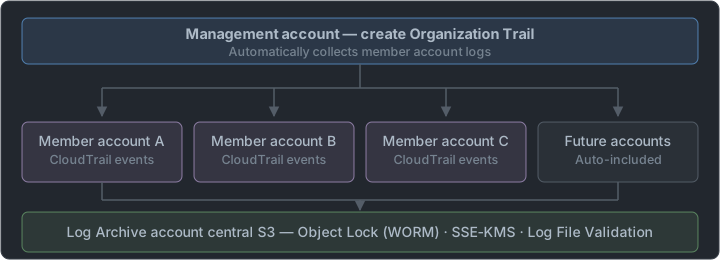
A centralized log archive is a core design pattern of AWS Landing Zone (now Control Tower). The reason for having a separate Log Archive Account is "to prevent an attacker from deleting logs from a compromised workload account." Even if an attacker compromises account A, they cannot erase the logs without permissions on the Log Archive Account's S3 bucket. This is the security value of account separation.
EventBridge Integration: Real-Time Security Response
All CloudTrail events are automatically sent to the EventBridge default bus. You only need to create a Rule, with no separate enabling.
The most commonly used security Rule patterns:
// Root user console login
{
  "source": ["aws.signin"],
  "detail-type": ["AWS Console Sign In via CloudTrail"],
  "detail": { "userIdentity": { "type": ["Root"] } }
}

// IAM policy changes (privilege escalation risk)
{
  "source": ["aws.iam"],
  "detail-type": ["AWS API Call via CloudTrail"],
  "detail": {
    "eventName": [
      "AttachRolePolicy", "PutRolePolicy", "CreatePolicy",
      "CreateAccessKey", "UpdateAccessKey", "DeletePolicy"
    ]
  }
}

// Adding an allow-all rule to a security group
{
  "source": ["aws.ec2"],
  "detail-type": ["AWS API Call via CloudTrail"],
  "detail": {
    "eventName": ["AuthorizeSecurityGroupIngress"],
    "requestParameters": {
      "ipPermissions": {
        "items": {
          "ipRanges": { "items": { "cidrIp": ["0.0.0.0/0"] } }
        }
      }
    }
  }
}
If you connect SNS, Lambda, or SSM Automation as targets of these Rules, detection → response is automated.
As a hypothetical case, at a Korean startup (anonymous) in 2021, an intern developer accidentally added a 0.0.0.0/0:3306 (MySQL allow-all) rule to an RDS security group. An EventBridge Rule detected AuthorizeSecurityGroupIngress, and an SSM Automation Runbook automatically removed that rule within 2 minutes. The intern learned of the mistake the next day through a Slack alert. It is a case where CloudTrail + EventBridge's "detect and auto-remediate" pattern worked.
Enabling S3 Data Events: A Cost Optimization Pattern
Turning on Data Events for every S3 bucket makes cost explode. The selective enabling pattern is important.
# Enable Data Events only for specific sensitive buckets
aws cloudtrail put-event-selectors \
  --trail-name "org-master-trail" \
  --event-selectors '[
    {
      "ReadWriteType": "All",
      "IncludeManagementEvents": true,
      "DataResources": [
        {
          "Type": "AWS::S3::Object",
          "Values": [
            "arn:aws:s3:::financial-data-bucket/",
            "arn:aws:s3:::pii-data-bucket/",
            "arn:aws:s3:::audit-logs-bucket/"
          ]
        },
        {
          "Type": "AWS::Lambda::Function",
          "Values": ["arn:aws:lambda"]
        }
      ]
    }
  ]'
If you specify only the service ARN like "arn:aws:lambda", it tracks every Lambda function invocation in that Region. For S3, you can control cost by selecting per bucket and tracking only the buckets that hold PII and financial data.
CloudTrail and CloudWatch Integration: Metric Filter Alarms
If you integrate CloudTrail with CloudWatch Logs, you can create alarms from log patterns.
# Integrate the Trail with CloudWatch Logs
aws cloudtrail update-trail \
  --name "org-master-trail" \
  --cloud-watch-logs-log-group-arn \
    "arn:aws:logs:ap-northeast-2:111122223333:log-group:CloudTrail/org:*" \
  --cloud-watch-logs-role-arn \
    "arn:aws:iam::111122223333:role/CloudTrail_CWLogs_Role"

# Metric Filter for the IAM policy change alarm
aws logs put-metric-filter \
  --log-group-name "CloudTrail/org" \
  --filter-name "IAMPolicyChanges" \
  --filter-pattern '{ ($.eventName = AttachRolePolicy) ||
                      ($.eventName = PutRolePolicy) ||
                      ($.eventName = CreateAccessKey) ||
                      ($.eventName = DeletePolicy) }' \
  --metric-transformations \
    metricName=IAMPolicyChanges,metricNamespace=Security,metricValue=1

# Create an alarm on that metric
aws cloudwatch put-metric-alarm \
  --alarm-name "IAM-Policy-Changes" \
  --metric-name "IAMPolicyChanges" \
  --namespace "Security" \
  --period 300 \
  --evaluation-periods 1 \
  --datapoints-to-alarm 1 \
  --statistic Sum \
  --threshold 1 \
  --comparison-operator GreaterThanOrEqualToThreshold \
  --alarm-actions "arn:aws:sns:ap-northeast-2:111122223333:security-alerts"
Comparison with Other Platforms
| Item | CloudTrail | GCP Cloud Audit Logs | Azure Activity Log |
|---|---|---|---|
| Default retention | 90 days (Event History) | 400 days | 90 days |
| Long-term retention | Trail → S3 | Log Router → Cloud Storage | Diagnostic Setting → Storage |
| Organization integration | Organization Trail | Organization audit logs aggregated automatically | Tenant-level Activity Log |
| Integrity verification | Log File Validation (SHA-256) | CMEK + separate verification tools | Immutable Storage policy |
| ML-based anomaly detection | CloudTrail Insights | Cloud Security Command Center | Microsoft Sentinel |
| SQL analysis | CloudTrail Lake | BigQuery Export | Log Analytics Workspace |
GCP differs from CloudTrail's 90 days in that Admin Activity logs are on by default, free, and retained for 400 days. In Azure, the subscription-level Activity Log is retained free for 90 days.
Summary
CloudTrail is not a tool only for "post-incident analysis." Integrated with EventBridge, "real-time detection and response" becomes possible, and integrated with CloudWatch Logs, it becomes "pattern-based alarms." Unifying multiple accounts with an Organization Trail automates "company-wide auditing." Understanding these three roles and judging which event type (Management vs Data vs Insights) is needed when is the core of the exam.
📝 Practice Questions
Click a choice to reveal the answer and explanation.
Question 1
The security team needs to trace "who downloaded customer PII data from the production S3 bucket." What CloudTrail setting is needed?
Question 2
A company operates 30 AWS accounts. How do you collect API calls from all accounts centrally and also automatically include accounts added in the future?
Question 3
What is the purpose of CloudTrail Log File Validation?
Question 4
You want to receive an SNS notification immediately when the Root user logs in to the console. What configuration is needed?
Question 5
You searched for an event from 6 months ago in the CloudTrail Event History console and it is not there. Why?
Question 6
Which most accurately describes the difference between Management Events and Data Events?