Based on the SAA-C03 exam guideReport an error
SAA-C03· AssociateWeek 3 · Day 2~41 min read
Day 2 - EBS vs Instance Store: Trading Persistence for Performance, and Choosing a File System
Storage-selection mistakes quietly cost a lot. Data stored on an EC2 instance store disappears along with the instance when it terminates, a database stalls after hitting the IOPS limit on EBS gp2, or you should have used FSx for Windows instead of EFS but insisted on a Linux mount and AD authentication didn't work. Most of these selection errors come from not knowing "how it actually works."
In this article we cover the internal design principles of each EBS volume type (IOPS calculation, gp3 vs gp2), the physical structure of Instance Store and its data-loss scenarios, the distributed file system structure of EFS, and the reason each of the 4 FSx types exists. If you read it by connecting storage-system theory to real incident cases, exam scenarios become readable.
The History of EBS: Why Network Block Storage Was Needed
In the early days of EC2, all storage was instance store. It used the local disks attached to the physical server as-is, and when you terminated the instance the data disappeared too. Developers had to manually back up important data to S3.
In 2008, AWS launched EBS (Elastic Block Store). The core idea was to separate block storage over the network. When the instance and storage are logically separated, the data stays alive even if the instance terminates, and you can detach it from one instance and reattach it to another. That is the meaning of the name "Elastic."
EBS's physical structure consists of separate storage servers within the same AZ. A volume's data is distributed across multiple storage servers to survive a single server failure. EC2 instances access EBS via the NVMe-over-TCP protocol through the Nitro card.
Communication between EBS and an EC2 instance uses NVMe over TCP, but this path is offloaded to the Nitro card and consumes no instance CPU. Note that this network path doesn't share the instance's overall network bandwidth and uses a separately optimized channel. Dedicated EBS bandwidth (EBS-Optimized) guarantees this path. On an m6i.xlarge, up to 4750 Mbps can be allocated to EBS.
EBS Volume Types: Design Principles and What the Numbers Mean
gp2 vs gp3: Why gp3 Is Better
gp2 is a 1st-generation SSD type launched in 2014, and its IOPS are tied to volume size. 3 IOPS per GB, up to 16,000 IOPS. At first the simple model of "bigger volume = faster" seemed reasonable. In practice, though, there was waste in having to make volumes excessively large just to get IOPS. If you needed 5,000 IOPS, you had to buy 1,667 GB.
gp3 launched in 2020 and completely decoupled IOPS from volume size. Every gp3 volume provides a baseline of 3,000 IOPS and 125 MB/s throughput regardless of size. In addition, you can independently provision IOPS up to 16,000 and throughput up to 1,000 MB/s. And it's 20% cheaper than gp2.
[ gp2 IOPS model ]
Volume size × 3 = IOPS (max 16,000)
→ To get 5,000 IOPS: must buy at least 1,667GB

[ gp3 IOPS model ]
Baseline 3,000 IOPS + additional provisioning (max 16,000)
→ To get 5,000 IOPS: possible even on a 10GB volume
→ 20% cheaper than gp2
⚠️ Trap: Existing EBS gp2 volumes are not automatically converted to gp3. You have to run
modify-volumemanually from the console or CLI, and the instance keeps running during the conversion (no downtime). In large environments, a pattern is used where an AWS Config rule detects gp2 volumes and Lambda converts them automatically.
io1/io2 and io2 Block Express: When Are They Needed
gp3's maximum IOPS is 16,000. Most OLTP workloads on Oracle DB, MySQL, and PostgreSQL fit within this. However, if you need hundreds of thousands of IOPS and extremely low latency (under 1 ms), as with SAP HANA or large financial transaction systems, you need io2 Block Express.
| Type | Max IOPS | Max Throughput | Max size | latency |
|---|---|---|---|---|
| gp3 | 16,000 | 1,000 MB/s | 16 TB | A few ms |
| io1 | 64,000 | 1,000 MB/s | 16 TB | Under 1 ms |
| io2 | 64,000 | 1,000 MB/s | 16 TB | Under 1 ms |
| io2 Block Express | 256,000 | 4,000 MB/s | 64 TB | sub-ms |
How is io2 Block Express's 256K IOPS possible? The existing EBS stack goes through the Amazon EBS API layer, but io2 Block Express uses a new storage server architecture directly integrated with the AWS Nitro hypervisor. It applies the NVMe-over-Fabric concept to AWS's internal network, dramatically increasing latency and throughput performance.
io1/io2 Multi-Attach is a feature that attaches a single EBS volume to multiple EC2 instances at the same time. Note, however, that this is not file-system-level sharing. If multiple instances write to the same block simultaneously, data gets corrupted. Use Multi-Attach only when a cluster-aware file system (GFS2, OCFS2, Oracle Cluster File System) or cluster software manages write coordination.
The concurrent-write problem in Multi-Attach is the same problem as Concurrency Control in distributed systems. Like a database's MVCC (Multi-Version Concurrency Control), a cluster file system coordinates which blocks each node is writing using a Distributed Lock. GFS2 uses GDLM (Global Distributed Lock Manager) for this.
HDD Types: st1 and sc1
When SSDs are expensive, there are cases where HDD-based EBS is cost-effective.
st1 (Throughput Optimized HDD) is optimized for sequential large reads/writes. These are workloads that read large files in order, such as Hadoop MapReduce, log aggregation, and data warehouse ETL. It provides up to 500 MB/s throughput, but IOPS are low (max 500), making it unsuitable for random access.
sc1 (Cold HDD) is a type for storing very infrequently accessed data at the lowest cost. It's used for archive data read once a month or less.
The reason HDD random access performance is lower than SSD lies in the physical structure. An HDD's head must physically move (Seek Time, average 5-10 ms), and the platter must rotate (Rotational Latency, average 2-4 ms for 7200 RPM). An SSD accesses NAND flash cells with electrical signals, so μs-level access is possible with no mechanical movement. This difference shows up as the IOPS difference (hundreds for HDD vs hundreds of thousands for SSD).
EBS Snapshots: How Incremental Backup Works
EBS snapshots are stored in S3, but they don't appear directly as an S3 bucket in the AWS console. Internally they're stored in an S3 managed by AWS.
What matters is the incremental backup approach. The first snapshot copies all the data. Subsequent snapshots store only the diff from the previous snapshot. However, when restoring a snapshot, a full restore is possible from any single snapshot. Internally, AWS references the previous snapshots to reconstruct the full data.
[ EBS snapshot incremental structure ]

snap-001: [A][B][C][D][E]  ← full copy
snap-002: [A][B'][C][D][E'] ← only B and E changed → store only B', E'
snap-003: [A][B'][C'][D][E'] ← only C changed → store only C'

Restoring snap-003: A(snap-001) + B'(snap-002) + C'(snap-003) + D(snap-001) + E'(snap-002)
→ Can be restored independently from any snapshot
FSR (Fast Snapshot Restore) eliminates the first-read performance degradation when restoring a volume from a snapshot. Normally, the blocks of a restored volume use a "lazy restore" approach in which they're fetched from S3 in the background when actually accessed. FSR performs this pre-initialization ahead of time so you get high performance immediately. It incurs additional cost.
Case: In March 2020, as the early COVID shift to remote work caused AWS usage to surge, many companies urgently restored large EBS volumes from snapshots. Many cases were reported of "snapshot performance degradation," where volumes restored without FSR delivered only 10-20% of normal IOPS for the first few hours. For production restore scenarios, enabling FSR is recommended even if it adds cost.
EBS Snapshot Archive is a feature that tiers snapshots that need long-term retention of 90 days or more to S3 Glacier. It saves 75% in cost but restores take 24 to 72 hours. It's suitable for DR snapshots that are "barely used even once a year."
Instance Store: Fast but Unreliable Storage
Instance Store is NVMe SSD directly attached to the physical server where the EC2 instance runs. Since it's accessed directly over the PCIe bus with no network hop, it delivers millions of IOPS and microsecond-level latency.
You need to know the data-loss scenarios precisely.
| Situation | Instance Store data |
|---|---|
| Instance reboot | Retained |
| Instance stop | Lost (may move to a different physical host) |
| Instance terminate | Lost |
| Physical host failure | Lost |
| Instance hibernate | Lost |
The reason data disappears on stop is that restarting after a stop doesn't guarantee the same physical host. If it starts on a different physical server, there's no way to reach the previous physical disk.
Instance Store data loss should be treated the same as a Crash Fault in distributed systems. In the design of highly available NoSQL databases (e.g., Cassandra, MongoDB), the storage loss of a single node is assumed to be a normal operating condition, and durability is ensured through replication. When running Cassandra on i4i instances (NVMe, Instance Store), you must distribute across 3 AZs with a replication factor of 3 so that no data is lost if a single instance is lost.
Case: Netflix uses a pattern of running part of its Cassandra clusters on i3 instances (Instance Store). Even if an instance terminates, the data is preserved by Cassandra's 3-way replication. In this structure it can take advantage of Instance Store's extreme I/O performance while eliminating EBS costs. There is an operational overhead, though: Cassandra repair work is needed more often.
EFS: AWS's Distributed NFS
EFS (Elastic File System) is a fully managed distributed file system that uses the NFSv4.1 protocol. Multiple EC2 instances can mount it simultaneously to read and write. Capacity grows and shrinks automatically (up to the petabyte scale).
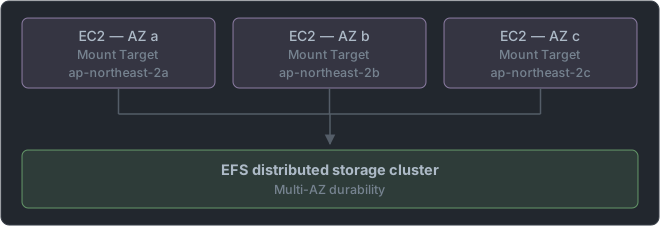
EFS's internal structure consists of storage servers distributed across multiple AZs. Each file is stored across multiple servers to secure availability and durability. Clients access it through EFS mount targets (one placed in each AZ).
Performance modes:
generalPurpose: The default. Suitable for 99% of workloads. Metadata operations are fast.maxIO: Highly parallel workloads accessed concurrently by thousands of clients or more. Latency is slightly higher but throughput scalability is excellent.
Throughput modes:
Bursting: Can burst in proportion to data size. Baseline 100 MB/s + consuming accumulated credits.Provisioned: Specify the desired throughput regardless of size. For when you need high throughput with little data.Elastic: Adjusts automatically based on actual usage. Most convenient for unpredictable traffic.
EFS's distributed lock structure is similar to the principles of NFS 4.1's pNFS (Parallel NFS). pNFS is defined in RFC 5661 and enables parallel reads/writes by distributing data servers across multiple nodes. EFS abstracts this into AWS's internal implementation.
EFS storage classes:
Standard: Frequently accessed files.Standard-IA (Infrequent Access): Files not accessed for 30 days or more. Moved automatically by an EFS Lifecycle Policy.One Zone: Single AZ, cheaper but affected by an AZ failure.One Zone-IA: One Zone + IA. The cheapest.
An EFS Access Point is a mount point with specific POSIX user/group permissions and a specific directory root applied. It's used when multiple applications share the same EFS but need to be isolated with different directories and permissions. It suits multi-tenant file sharing architectures.
The 4 FSx Types: The Reason Each Exists
The reason AWS created the FSx series is simple. EFS is a general-purpose file system based on NFSv4.1, but certain workloads need special file system protocols or features.
FSx for Windows File Server: The Value of Active Directory Integration
File sharing in Windows environments requires the SMB (Server Message Block) protocol, Windows NTFS, and Active Directory integration. EFS, being based on Linux NFS, can't do this.
FSx for Windows runs real Windows Server as a managed service. It integrates with AWS Managed Active Directory or on-premises AD and supports Kerberos authentication, NTFS ACLs, Shadow Copies, and DFS Namespaces. It can also be used for SQL Server FCI (Failover Cluster Instance).
With a Multi-AZ deployment, automatic failover completes within 30 seconds. Storage capacity can be chosen as SSD or HDD.
⚠️ Trap: If you see "Windows file server + Active Directory + SMB," don't choose EFS. EFS can be mounted from a Windows client through an NFS client, but it doesn't support AD integration, NTFS permissions, or SMB characteristics. The exam asks about this distinction.
FSx for Lustre: A Parallel File System for HPC and ML
Lustre is a high-performance parallel file system designed by Peter Braam in 1999 (the name is a portmanteau of Linux + Cluster). Many of the world's Top 500 supercomputers use Lustre. The US Department of Energy (DOE)'s Summit and Frontier supercomputers also use Lustre.
Lustre's design principle is to stripe data across multiple storage servers (OST: Object Storage Targets) to scale aggregate throughput linearly. Striping a file across 1,000 OSTs yields 1,000 times the throughput. Metadata is managed by a separate MDS (Metadata Server).
FSx for Lustre provides up to hundreds of GB/s of throughput and millions of IOPS. An important feature is direct S3 integration. When you link an S3 bucket to a Lustre file system, S3 objects appear transparently as Lustre files. An ML training job can access tens of TB of data in S3 like local files.
[ FSx for Lustre + S3 ML training pattern ]

S3 bucket (training data) ─── lazy load ──→ FSx for Lustre ──→ EC2 ML instances
                                         (POSIX API)          (parallel reads)
                    ←── export ─────────────────────────────────────────────
Case: Amazon SageMaker officially supports FSx for Lustre as a training data source. If you store tens of TB of image data in S3 and serve it in parallel to many GPU instances through FSx for Lustre, you can maximize GPU utilization without a data-loading bottleneck. Going through Lustre can improve I/O throughput by 10 times or more compared to reading directly from S3.
FSx for NetApp ONTAP: Extending On-Premises NetApp to AWS
Many enterprises run NetApp ONTAP storage on-premises. When migrating this data to AWS or operating in a hybrid setup, FSx for NetApp ONTAP lets you synchronize using the same protocol as NetApp SnapMirror (replication).
Supported protocols: NFS, SMB, iSCSI. That is, it's a multi-protocol file system that Linux and Windows clients can access at the same time. NetApp's native features such as snapshots, replication, thin provisioning, deduplication, and compression are provided as-is.
ONTAP uses the WAFL (Write Anywhere File Layout) file system. WAFL is a patented structure developed by NetApp in 1994 that writes everything to a new location (no in-place overwrites) and can create snapshots in O(1). This is why NetApp snapshots are almost instantaneous. It's similar to ZFS's COW (Copy-on-Write) principle.
FSx for OpenZFS: Porting ZFS to the Cloud
ZFS is a file system developed by Sun Microsystems in 2005, with built-in data integrity guarantees (checksums), COW snapshots, compression, and deduplication. OpenZFS is the version that forked into open source after Oracle came to hold the ZFS patents.
FSx for OpenZFS is accessed from Linux clients over NFS. It suits workloads where data integrity and snapshot features matter (financial transaction records, medical imaging data) or scenarios migrating existing ZFS-based on-premises setups to AWS.
Storage Comparison with Other Clouds
| AWS | GCP | Azure | Characteristics |
|---|---|---|---|
| EBS | Persistent Disk | Azure Disk | Block, single VM |
| Instance Store | Local SSD | Temp Disk | Volatile local SSD |
| EFS | Filestore | Azure Files (NFS) | NFS share |
| FSx for Windows | N/A | Azure Files (SMB) | SMB + AD |
| FSx for Lustre | N/A | N/A | HPC parallel FS |
| FSx ONTAP | Google Cloud NetApp Volumes | Azure NetApp Files | NetApp managed |
GCP's Persistent Disk is similar to EBS, but Regional PD is synchronously replicated across two AZs. AWS EBS is by default replicated across multiple servers within a single AZ, and Multi-AZ replication is handled not by EBS itself but by higher-level services such as RDS.
Storage Gateway and DataSync: Hybrid Connectivity
AWS Storage Gateway is a virtual appliance installed on an on-premises server. Three modes:
- File Gateway: Local file access via NFS/SMB, with backend storage in S3. Frequently used files are cached locally.
- Volume Gateway: Provides iSCSI block volumes on-premises, backed up as EBS snapshots.
- Tape Gateway: Looks like a physical tape library but is actually stored in S3/Glacier.
AWS DataSync is a service that migrates or synchronizes file system data from on-premises or other clouds to AWS. It supports NFS, SMB, S3, EFS, and FSx as sources/destinations. Parallel transfer gives up to 10 times faster copy speed.
Trap: The two services get confused in "on-premises → AWS file migration." Storage Gateway suits ongoing hybrid operation (a structure where on-premises keeps using AWS storage), while DataSync suits one-time or periodic migration/synchronization jobs. Also, DataSync is up to 10 times faster than Storage Gateway.
Cementing Understanding with the CLI
# Convert a volume from gp2 to gp3 (no downtime)
aws ec2 modify-volume \
  --volume-id vol-1234567890abcdef0 \
  --volume-type gp3 \
  --iops 3000 \
  --throughput 125

# Create an EBS snapshot, then copy it to another Region
SNAP_ID=$(aws ec2 create-snapshot --volume-id vol-xxx --query 'SnapshotId' --output text)
aws ec2 copy-snapshot \
  --source-region ap-northeast-2 \
  --source-snapshot-id $SNAP_ID \
  --destination-region us-east-1 \
  --description "DR copy"

# Create EFS (Elastic throughput, GeneralPurpose)
aws efs create-file-system \
  --performance-mode generalPurpose \
  --throughput-mode elastic \
  --encrypted \
  --tags Key=Name,Value=shared-efs

# Set EFS Lifecycle Policy (not accessed for 30 days → move to IA)
aws efs put-lifecycle-configuration \
  --file-system-id fs-12345678 \
  --lifecycle-policies TransitionToIA=AFTER_30_DAYS

# Create FSx for Lustre (S3 integration)
aws fsx create-file-system \
  --file-system-type LUSTRE \
  --storage-capacity 1200 \
  --subnet-ids subnet-xxx \
  --lustre-configuration \
    DeploymentType=PERSISTENT_2,\
    PerUnitStorageThroughput=250,\
    ImportPath=s3://my-ml-data/training/,\
    ExportPath=s3://my-ml-data/checkpoints/

# Set EBS encryption-by-default (account/Region level)
aws ec2 enable-ebs-encryption-by-default --region ap-northeast-2
Wrap-Up
The core of storage selection is two dimensions. First, access pattern: single EC2 or many, block or file. Second, persistence: does the data need to be independent of the instance's lifetime?
EBS fits most single-EC2 workloads, and gp3 is the default choice. Instance Store is for cases that need extreme performance where data loss can be tolerated through replication, like caches and distributed DB node disks. EFS is the answer for a Linux multi-client shared file system, and FSx is for cases that need special protocols or features (Windows SMB+AD, HPC parallel processing, NetApp migration, ZFS integrity).
📝 Practice Questions
Click a choice to reveal the answer and explanation.
Question 1
You have a database server using a gp2 EBS volume (500GB). You want to increase IOPS performance while also reducing cost. What is the most suitable action?
Question 2
Multiple Linux EC2 instances running across multiple AZs must share common configuration files and logs. The number of instances may grow unpredictably. What is the most suitable storage?
Question 3
You're migrating data running on on-premises NetApp ONTAP storage to AWS. Both Linux and Windows servers must access the same file system, and you want to keep the on-premises NetApp SnapMirror replication as is. What is the most suitable service?
Question 4
An ML training team trains on many GPU instances using a 50TB image dataset stored in S3. Data loading is the bottleneck for GPU utilization. What storage configuration should be added?
Question 5
Which storage is suitable for the boot volume and data volume of a single-EC2-based PostgreSQL database whose data must be preserved even if the instance terminates unexpectedly or is relocated?
Question 6
A company wants to migrate data from an on-premises file server to AWS S3. It wants to transfer 100TB of data as fast as possible, and new files keep being added on the on-premises server during the transfer. Which service should be used?