Based on the Linux Master 2 exam syllabusReport an error
Linux Master 2· AssociateWeek 8 · Day 3~23 min read
Day 3 - Window Manager · Display Manager · Desktop Environment
📌 Key Takeaways
- The three do different jobs — the window manager handles windows, the display manager handles the login screen, and the desktop environment is the whole bundle.
- Window managers: KWin · Mutter · Metacity · Xfwm · Windowmaker · Afterstep · Enlightenment · Fluxbox · twm
- Display managers: XDM · GDM · KDM · SDDM · LightDM
- Desktop environments: GNOME · KDE · Xfce · LXDE · MATE · Cinnamon · CDE
- Questions that mix the names and ask you to pick the "one of a different kind" are repeatedly asked.
Where the Three Sit
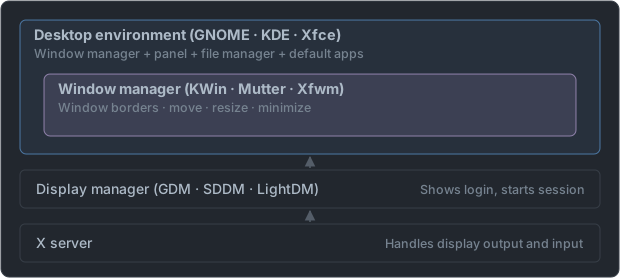
| Item | What it does | Without it |
|---|---|---|
| Window manager | Window borders, moving, resizing | You can neither move nor close windows |
| Display manager | Graphical login screen | Log in by text, then startx |
| Desktop environment | All of the above + panel, file manager, applications | Only windows appear, with no integrated environment |
The desktop environment contains the window manager. The fact that there is a containment relationship is the key to telling the three apart.
The Order in Which Things Appear After Power-On
   Boot complete (graphical.target)
        │
        ▼
   ① Display manager starts     launches the X server and draws the login screen      ← GDM · SDDM · LightDM
        │   enter ID and password, choose the session type
        ▼
   ② Session starts             the desktop environment comes up                       ← GNOME · KDE · Xfce
        │
        ├── window manager      window borders and placement                          ← Mutter · KWin · Xfwm
        ├── panel · desktop background
        └── file manager etc.   programs the user opens                               ← Nautilus · Dolphin · Thunar
        │
        ▼
③ Logout the session ends and returns to the login screen of ①| Item | When it operates | What the user sees |
|---|---|---|
| Display manager | Before login and after logout | The one login screen |
| Window manager | All the time after login | The title bar, borders, and buttons on each window |
| Desktop environment | All the time after login | The panel, menus, desktop background, and settings windows, all of it |
- The display manager and desktop environment can be chosen separately. It is possible to select a session on the login screen, enter through GDM, and use KDE. The "belongs to" column in the tables is just the default pairing.
- A window manager can be used alone without a desktop environment. Conversely, a desktop environment cannot exist without a window manager. Running only Fluxbox or twm on a light system is the former case.
- Because of the name "display manager", it is easy to mistake it for something that manages monitor resolution. What it does is login.
Window Managers
They handle drawing window borders, moving, resizing, and minimizing.
| Window manager | Belongs to |
|---|---|
| KWin | KDE |
| Mutter | GNOME 3 and later |
| Metacity | GNOME 2 |
| Xfwm | Xfce |
| Openbox | LXDE |
| Marco | MATE |
| Muffin | Cinnamon |
| Windowmaker | Standalone (NeXTSTEP style) |
| Afterstep | Standalone |
| Enlightenment | Standalone |
| Fluxbox, Blackbox | Standalone (lightweight) |
| FVWM, twm | Very old basics |
| Compiz | Dedicated to 3D effects |
twm(Tab Window Manager) is the simplest window manager, included with X by default.- Windowmaker · Afterstep · Fluxbox · Enlightenment are window managers used standalone that do not belong to a desktop environment. The names look unfamiliar, so they are easily used as choices.
Names with a Clue and Names Without
| Clue | Names that match | Note |
|---|---|---|
Ends in wm (window manager) | twm, FVWM, Xfwm, IceWM | The surest clue |
Ends in Win | KWin | KDE's window manager |
Ends in box | Openbox, Fluxbox, Blackbox | The lightweight window manager lineage |
| No clue — must be memorized | Mutter, Metacity, Marco, Muffin | All four are window managers of the GNOME lineage |
| No clue — must be memorized | Windowmaker, Afterstep, Enlightenment | Standalone window managers |
| Window manager | One-line history |
|---|---|
| Metacity → Mutter | Mutter in GNOME 3 succeeded GNOME 2's Metacity |
| Marco | The name MATE gave to what it inherited from Metacity |
| Muffin | The name Cinnamon gave to what it inherited from Mutter |
| Windowmaker · Afterstep | Both imitate the look of NeXTSTEP — that is why they appear together |
| Fluxbox | Built on top of Blackbox |
| FVWM | Split off from twm |
- Of the four starting with M, three are window managers and only
MATEis a desktop environment. In a set of choices likeMetacity · Mutter · Marco · MATE, the odd one out is MATE. - Combining windows into one screen while producing translucency, shadows, and window-switching effects is called compositing. Compiz was famous for these effects, and now KWin and Mutter do it themselves.
Display Managers
They handle the graphical login screen that appears after boot. When login succeeds, they start the session.
| Display manager | Belongs to |
|---|---|
| XDM | The default of the X Window System. The simplest |
| GDM | GNOME (GNOME Display Manager) |
| KDM | The former KDE |
| SDDM | The current KDE Plasma |
| LightDM | Ubuntu, Xfce — lightweight |
| LXDM | LXDE |
- The first letter of the name is a hint — GDM is GNOME, KDM is KDE, and XDM is X's default.
- If you do not use a display manager, you log in by text and then launch X with
startx.
| Name | Full name | Additional notes |
|---|---|---|
| XDM | X Display Manager | The original, shipped with X. Almost no decoration |
| GDM | GNOME Display Manager | The current default Ubuntu edition also uses GNOME, so it is GDM |
| KDM | KDE Display Manager | Up to KDE 4 |
| SDDM | Simple Desktop Display Manager | Took KDM's place from KDE Plasma 5 |
| LightDM | (Light + DM) | A lightweight one not tied to any particular desktop. Common in the Xfce family and was the default of older Ubuntu |
- A display manager does three things — launches the X server, authenticates the user, and starts the chosen session.
- The protocol used to bring up the login screen of a remote computer on my X server is XDMCP (X Display Manager Control Protocol). As the name says, it pairs with the display manager.
- You can check which one is running now with
systemctl status display-manager. - You turn on only one display manager at a time. Even if you install two, only one comes up at boot.
Desktop Environments
They bundle a panel, file manager, settings tools, and default applications on top of the window manager and provide one integrated environment.
| Desktop environment | Toolkit | Window manager | File manager |
|---|---|---|---|
| GNOME | GTK+ | Mutter | Nautilus |
| KDE (Plasma) | Qt | KWin | Dolphin |
| Xfce | GTK+ | Xfwm | Thunar |
| LXDE | GTK+ | Openbox | PCManFM |
| LXQt | Qt | Openbox | PCManFM-Qt |
| MATE | GTK+ | Marco | Caja |
| Cinnamon | GTK+ | Muffin | Nemo |
| CDE | Motif | — | — |
- GNOME and KDE are the two major camps. The key pairing is that GNOME is based on GTK+ and KDE on Qt.
- Xfce and LXDE are lightweight environments, used on old computers.
- CDE (Common Desktop Environment) is the standard desktop of traditional commercial Unix and is Motif-based.
| Environment | History · nature |
|---|---|
| KDE | Started in 1996. The name comes from K Desktop Environment, and today's desktop is called KDE Plasma |
| GNOME | Started in 1997. It is the desktop of the GNU project |
| Xfce | Aims to be light. It was first built with XForms and then moved to GTK+ |
| LXDE | Lightweight X11 Desktop Environment — "lightweight" right in the name |
| LXQt | LXDE rebuilt with Qt |
| MATE | Split off to carry on GNOME 2 |
| Cinnamon | Split off from GNOME 3. Made by Linux Mint |
| CDE | A standard jointly set by commercial Unix companies in the 1990s. Its window manager is dtwm |
- If asked about the lightness order, generally LXDE and Xfce are on the light side and GNOME and KDE are on the heavy side.
- Grouped by toolkit, the GTK+ side is GNOME, Xfce, LXDE, MATE, and Cinnamon, and the Qt side is just two: KDE and LXQt. If asked to pick a "Qt-based desktop environment", it comes from these two.
Programs That Come with the Desktop Environment
A desktop environment has a set of default programs beyond the file manager. Questions that give a purpose and ask you to pick the program come from this area.
| Purpose | GNOME side | KDE side |
|---|---|---|
| File manager | Nautilus | Dolphin (formerly Konqueror) |
| Terminal | GNOME Terminal | Konsole |
| Text editor | gedit | Kate, KWrite |
| Document (PDF) viewing | Evince | Okular |
| Image viewing | eog (Eye of GNOME) | Gwenview |
| Video playback | Totem | Dragon Player |
| Music playback | Rhythmbox | Amarok |
| Purpose | Widely used programs not tied to a desktop |
|---|---|
| Image editing | GIMP (photo editing) |
| Office | LibreOffice — Writer (documents) · Calc (spreadsheets) · Impress (presentations) · Draw (drawing) |
| Web browser | Firefox, Chromium |
| Video playback | VLC |
- Distinguish "viewing" from "editing". eog and Gwenview are programs for viewing images, and GIMP is a program for editing. Evince and Okular are programs for viewing PDFs.
- Pair the four of LibreOffice as Writer–documents, Calc–spreadsheet calculation, Impress–presentations, Draw–drawings.
- These programs are X clients. They are neither window managers nor display managers, so if they are mixed into a classification question, place them in the "application" column.
Questions That Mix and Ask You to Pick
"Which of the following is of a different kind from the other three?"
KWin · Xfce · Windowmaker · Afterstep→ It is Xfce. The other three are window managers, and only Xfce is a desktop environment.
| When mixed, sort them like this | |
|---|---|
| KWin, Mutter, Xfwm, Windowmaker, Afterstep, Fluxbox | Window managers |
| XDM, GDM, KDM, SDDM, LightDM | Display managers (end in DM) |
| GNOME, KDE, Xfce, LXDE, MATE, CDE | Desktop environments |
| Nautilus, Dolphin, Thunar, PCManFM | File managers |
- The rule that a name ending in
DMis a display manager is the easiest clue. - Do not confuse Xfce and Xfwm. Xfce is the desktop environment and Xfwm is its window manager. They differ by one letter, so they appear together in choices.
The Order of Sorting
When you get four names, sift them in the order below.
   ① Does it end in DM?               → display manager   (XDM · GDM · KDM · SDDM · LightDM · LXDM)
   ② Does it end in wm · Win · box?   → window manager    (twm · FVWM · Xfwm · KWin · Openbox · Fluxbox)
   ③ Is it GNOME · KDE · Xfce · LXDE · LXQt · MATE · Cinnamon · CDE?   → desktop environment
   ④ Among the rest, Mutter · Metacity · Marco · Muffin · Windowmaker · Afterstep · Enlightenment · Compiz
                                      → window manager (names without a clue)
⑤ Nautilus · Dolphin · Thunar · PCManFM · Caja · Nemo → file manager| Choices | The odd one | Reason |
|---|---|---|
GDM · SDDM · LXDE · LightDM | LXDE | Does not end in DM — a desktop environment |
Mutter · Metacity · Marco · MATE | MATE | The rest are window managers |
Nautilus · Dolphin · Thunar · Mutter | Mutter | The rest are file managers |
GNOME · Xfce · LXDE · KDE (by toolkit) | KDE | Alone is Qt, the rest are GTK+ |
Fluxbox · Openbox · Enlightenment · LXQt | LXQt | The rest are window managers |
The window manager among KDE · KDM · KWin · Konsole | KWin | KDE is the environment, KDM is the login, and Konsole is the terminal |
- There is a trick of gathering names that begin with the same initial into one set of choices. They separate the four starting with K, Xfce, Xfwm, and XDM starting with X, and GNOME, GDM, and GTK+ starting with G.
- LXDE and LXDM also differ by one letter. Ending in E means Environment, and ending in M means Manager.
Tomorrow we cover how to actually run X and bring up a remote screen.
📖 Glossary
- Window manager: The program that handles window borders and moving and resizing.
- Display manager: The program that provides the graphical login screen and starts the session.
- Desktop environment: An integrated environment bundling a panel, file manager, and applications on top of a window manager.
- KWin / Mutter / Xfwm: The window managers of KDE, GNOME, and Xfce respectively.
- GDM / SDDM / LightDM: The display managers used by GNOME, KDE Plasma, and Ubuntu respectively.
- twm: The simplest window manager, included with X by default.
- CDE: A Motif-based desktop environment of traditional commercial Unix.
- File manager: A program that handles files and folders graphically. Nautilus, Dolphin, Thunar, etc.
📝 Practice Questions
Click a choice to reveal the answer and explanation.
Question 1
Which of the following is of a different kind from the other three?
Question 2
Which of the following is a display manager that provides the graphical login screen?
Question 3
Which of the following is the window manager used in the KDE desktop environment?
Question 4
Which of the following draws window borders and handles moving and resizing windows?
Question 5
Which of the following is the file manager used in the GNOME desktop environment?