Based on the Linux Master 2 exam syllabusReport an error
Linux Master 2· AssociateWeek 1 · Day 4~22 min read
Day 4 - Distributions: The Unit That Bundles the Kernel and Tools for Sale
📌 Key Takeaways
- Distribution = Linux kernel + GNU tools + package manager + installer + application software.
- The three major families: Red Hat family (RPM), Debian family (DEB), and SUSE family (RPM).
- You tell families apart by package format — RPM is Red Hat and SUSE, DEB is Debian and Ubuntu.
- Stability flows Fedora → RHEL → CentOS/Rocky/Alma. Fedora is the testing ground.
- Android is also based on the Linux kernel, but it doesn't use the GNU tools, so it differs from ordinary distributions.
What Is a Distribution?
With only a kernel, you can't use a computer. To actually use one, you need all of this in addition.
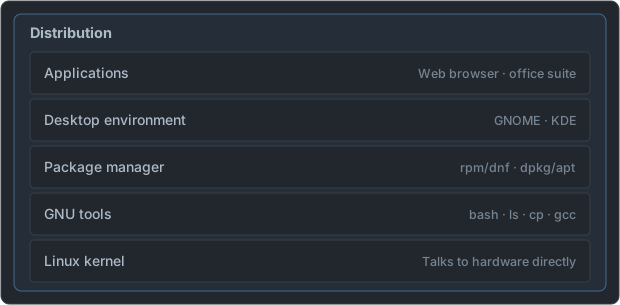
- Every distribution uses the very same kernel (only the version differs).
- What sets distributions apart are package format, management tools, default settings, and support policy.
The Three Major Families
| Family | Package format | Low-level tool | High-level tool | Representative distributions |
|---|---|---|---|---|
| Red Hat | .rpm | rpm | yum → dnf | RHEL, CentOS, Rocky, Alma, Fedora |
| Debian | .deb | dpkg | apt, apt-get | Debian, Ubuntu, Mint |
| SUSE | .rpm | rpm | zypper | SLES, openSUSE |
Trap: SUSE also uses RPM. If you memorize only "RPM = Red Hat," you'll be wrong. It's safer to tell them apart by the high-level tool —
dnfmeans Red Hat,zyppermeans SUSE.
How Low-Level and High-Level Tools Differ
The reason the tools are split into two columns in the table is dependencies. A single program usually needs several other libraries installed in order to run.
| Category | Low-level tools (rpm, dpkg) | High-level tools (dnf, apt, zypper) |
|---|---|---|
| What they handle | One package file you have in hand | Packages in an internet repository |
| Dependencies | Only tell you about them. You must fetch them yourself | Automatically find and install the needed packages together |
| When to use | Install from a downloaded file, query install info | Everyday install, removal, and updates |
Here is how you type the same job in each family, side by side (detailed options are covered in Week 7).
| Task | Red Hat family | Debian family | SUSE family |
|---|---|---|---|
| Install from a repository | dnf install package | apt install package | zypper install package |
| Remove | dnf remove package | apt remove package | zypper remove package |
| Install from a file | rpm -ivh file.rpm | dpkg -i file.deb | rpm -ivh file.rpm |
| List installed | rpm -qa | dpkg -l | rpm -qa |
- The relationship between
yumanddnf:dnfis the successor toyum. From RHEL 8,dnfis the default, and theyumcommand remains for compatibility and links todnf. - The relationship between
aptandapt-get:aptcame later and is polished to be friendlier for humans. They do the same job.
⚠️ Trap: On the Debian family,
apt updateonly refreshes the repository lists. Actually upgrading packages isapt upgrade. On the Red Hat family,dnf updateactually upgrades packages. Even with the same name, they do different things.
Red Hat Family
   Fedora  ──────►  RHEL  ──────►  CentOS Stream / Rocky / Alma
 (testing ground)  (commercial     (free RHEL-compatible
                    stable)          versions)
  Latest tech       Paid support    Free rebuilds
Fast cycle Long-term support- Fedora: A testing ground that tries new technologies first. Short cycles and big changes.
- RHEL (Red Hat Enterprise Linux): A commercial distribution that contains what was proven in Fedora. Paid technical support is the product.
- CentOS: Used to be a free version that rebuilt the RHEL source as-is. In 2021 the policy changed and it became CentOS Stream (upstream of RHEL), and Rocky Linux and AlmaLinux filled the gap it left.
The diagram above simplifies the "direction stability flows," and the actual order in which code flows is a bit finer.
   Fedora  ──►  CentOS Stream  ──►  RHEL  ──►  Rocky Linux · AlmaLinux
 (experiment)   (previews the next   (commercial)  (free versions rebuilt
RHEL version) to be compatible with RHEL)| When | Event |
|---|---|
| 2003 | The free 'Red Hat Linux' ended, and it split into Fedora for the community and RHEL for enterprises |
| Late 2020 | Red Hat announced it was changing CentOS's direction to CentOS Stream |
| 2021 | CentOS Linux 8 support ended (at year-end). The first releases of AlmaLinux and Rocky Linux appeared |
| June 2024 | CentOS Linux 7 support ended — the old-style CentOS was completely over |
- The old CentOS sat after RHEL (it rebuilt RHEL as-is). CentOS Stream sits before RHEL (it receives what will go into the next RHEL first). The name continued, but the position is exactly the opposite.
- So the old CentOS's role as a "free version identical to RHEL" is now taken over by Rocky and Alma.
Debian Family
- Debian: Built by a non-profit community. It puts stability first, so its packages are conservative.
- Ubuntu: Built by Canonical on a Debian base. It has good desktop usability, and LTS (long-term support) versions are supported for 5 years.
- Linux Mint: Based on Ubuntu. It offers a more familiar desktop.
Debian runs three branches at the same time.
| Branch | Character |
|---|---|
| stable | The official release. This is what you use on servers |
| testing | The candidate for the next stable |
unstable (nickname sid) | Where new packages first arrive |
Ubuntu's version number is the release year and month.
   22.04 LTS        23.10          24.04 LTS
   │  │             │  │           │  │
   │  └ April        │  └ October    │  └ April
└─── 2022 └─── 2023 └─── 2024- A new version comes out every 6 months (April and October), and every 2 years the April version of the even-numbered year becomes the LTS.
- Non-LTS regular versions are supported for only 9 months, so servers use the LTS.
SUSE Family
- SLES (SUSE Linux Enterprise Server): A commercial distribution. Strong in Europe.
- openSUSE: The free community edition. Its hallmark is an integrated configuration tool called
YaST.
Other Things to Know
| Distribution | Feature |
|---|---|
| Slackware | One of the oldest distributions. Simple and close to Unix |
| Gentoo | Installs by compiling the source yourself. High freedom for optimization |
| Arch | Rolling release. Always stays up to date |
| Android | Based on the Linux kernel, but uses its own libraries instead of the GNU tools |
| Raspberry Pi OS | Debian-based. For small boards |
Past exams include questions asking for "an operating system based on the Linux kernel" with Android among the options. Android is a separate layer made by Google on top of the Linux kernel, so it shares only the kernel and its composition differs from ordinary distributions.
Who Came from Whom
Most distributions were not built from the ground up but on top of an earlier distribution. Questions asking you to pick "the one with a different base" come from this family tree.
| Distribution | First released | Base | What to remember |
|---|---|---|---|
| Slackware | 1993 | (an early distribution called SLS) | Created by Patrick Volkerding. The oldest distribution still continuing today |
| Debian | 1993 | Independent | Started by Ian Murdock. The name combines his wife Debra and himself, Ian |
| SUSE | Early 1990s | Originally Slackware | Started in Germany |
| Ubuntu | 2004 | Debian | Sponsored by Canonical |
| Linux Mint | — | Ubuntu | The chain runs Debian → Ubuntu → Mint |
| Kali Linux | — | Debian | A distribution that collects security-audit and penetration-testing tools |
Distributions outside Red Hat, Debian, and SUSE each have their own package tools too.
| Distribution | Package tool | Feature |
|---|---|---|
| Arch | pacman | Receives pre-built packages on a rolling release |
| Gentoo | emerge (Portage) | Downloads the source and compiles it on your own computer |
| Slackware | pkgtool | Packages in compressed-archive form (.tgz, .txz). Doesn't resolve dependencies automatically |
Checking the Distribution You're Using
uname only tells you about the kernel. The distribution is told by files under /etc.
$ cat /etc/os-release
NAME="Rocky Linux"
VERSION="9.3 (Blue Onyx)"
ID="rocky"
ID_LIKE="rhel centos fedora"
VERSION_ID="9.3"
PRETTY_NAME="Rocky Linux 9.3 (Blue Onyx)"

$ cat /etc/redhat-release
Rocky Linux release 9.3 (Blue Onyx)| File / command | Where it exists | Contents |
|---|---|---|
/etc/os-release | Common to modern distributions | Name, version, family (ID_LIKE) |
/etc/redhat-release | Red Hat family | A one-line distribution name and version |
/etc/debian_version | Debian family | The Debian version |
lsb_release -a | When that package is installed | Distributor ID, description, release, codename |
- The
ID_LIKEline tells you the family. Rocky showsrhel centos fedora, and Ubuntu showsdebian. When you meet an unfamiliar distribution, look at this line first. - If you use a wildcard like
cat /etc/*-release, whatever distribution it is, all the matching files come out at once.
Commonly Mistaken Points
- "If it uses RPM, it's the Red Hat family" → SUSE is RPM too. If you see
zypperorYaST, it's SUSE. - "Ubuntu is the Red Hat family" → It's the Debian family. Mint also reaches Debian by way of Ubuntu.
- "Fedora is a free rebuild of RHEL" → It's the opposite. Fedora sits before it, and RHEL is built from it. The rebuilds are Rocky and Alma.
- "Each distribution has a different kernel" → The kernel is the same Linux kernel; only the version and configuration differ.
- "A rolling release is the most stable" → It means always up to date, not stable. Stability lies with fixed releases and LTS.
Release Models
| Model | Description | Examples |
|---|---|---|
| Fixed release | Issues versions on a set cycle | Debian, Ubuntu, RHEL |
| Rolling release | Updates continuously with no version divisions | Arch, Gentoo |
| LTS | Supports a particular version for a long time | Ubuntu LTS (5 years), RHEL (10 years) |
Which Distribution Should You Pick?
- Servers and enterprise environments → RHEL, Rocky, AlmaLinux, SLES (long-term support and stability)
- Personal desktop and beginners → Ubuntu, Linux Mint (easy to install and use)
- Experimenting with the latest technology → Fedora, Arch
- Study and certification prep → Ubuntu or Rocky. It's good to get hands-on with both families
That's all for this week. Tomorrow we tie together the concepts covered in Week 1 on a single page.
📖 Glossary
- Distribution : The kernel, GNU tools, package manager, and applications bundled together into something installable.
- Package manager : A tool that manages software installation, removal, and dependencies.
dnf,apt,zypper, etc. - RPM : The package format used by the Red Hat and SUSE families, and also its management command.
- DEB : The package format used by the Debian and Ubuntu families.
- RHEL : Red Hat's commercial enterprise distribution. Paid technical support is the core product.
- Fedora : A community distribution that tests technologies destined for RHEL first.
- LTS : Long Term Support. A policy of maintaining a particular version for a long time.
- Rolling release : A distribution model that keeps updating to the latest state with no version divisions. Arch is the classic example.
📝 Practice Questions
Click a choice to reveal the answer and explanation.
Question 1
Which of the following is the package format used by Debian-family distributions?
Question 2
Which of the following pairings of a distribution and its high-level package management tool is NOT correct?
Question 3
Which of the following is a distribution whose role is to test technologies to be introduced into RHEL first?
Question 4
Which of the following is LEAST related to the components of a Linux distribution?
Question 5
Which of the following is an operating system that is based on the Linux kernel but uses its own libraries and runtime environment instead of the GNU tools?