Based on the Linux Master 2 exam syllabusReport an error
Linux Master 2· AssociateWeek 8 · Day 2~21 min read
Day 2 - Libraries and the Toolkit Layers
📌 Key Takeaways
- An X client talks to the X server through two layers — low-level libraries and the toolkits above them.
- There are two low-level libraries: Xlib and XCB. XCB is the lower level, closer to the X server.
- The representative toolkits are GTK+ · Qt · FLTK · Motif · Tk.
- GTK+ is written in C and used by GNOME, and Qt is written in C++ and used by KDE.
- They form pairs — Xlib ↔ XCB (low-level libraries), GTK+ ↔ Qt (toolkits).
The Four Layers
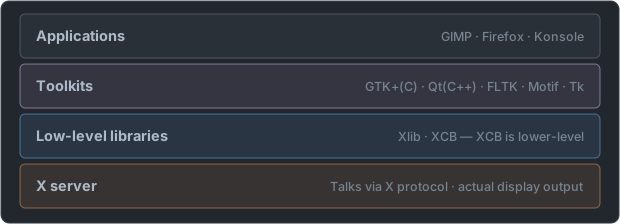
- The further down you go, the closer to the X server and the lower the level. This up-down relationship is asked as is.
- You can build a program with Xlib alone without a toolkit, but even drawing a single button means drawing each line yourself.
Until One "OK" Button Appears on the Screen
| Layer | What is said at this layer | Job |
|---|---|---|
| Application | "Put an 'OK' button here" | Decides what to show |
| Toolkit (GTK+ · Qt) | "A button is a rounded rectangle with text, and the color changes when pressed" | Builds the look and behavior of widgets |
| Low-level library (Xlib · XCB) | "A rectangle at coordinates (10,20), with text inside" | Converts drawing instructions into X protocol messages and sends them |
| X server | (Draws on the screen as received) | Handles the actual screen output and input devices |
- The three layers above (application, toolkit, low-level library) are all on the X client side. That is why Xlib and XCB are called "X client libraries", and they must not be mistaken for part of the X server.
- When you press the button with the mouse, it goes up in the opposite direction — the X server sends an event, the low-level library receives it, and the toolkit interprets it as "the button was pressed" and tells the program.
- Thanks to the layering, even if what is below changes, what is above can be used as is. GTK+ and Qt also work on Wayland, so programs built with toolkits run on both X and Wayland. Old programs that call Xlib directly need the XWayland we saw yesterday.
Low-Level Libraries — Xlib and XCB
| Item | Xlib | XCB |
|---|---|---|
| Full name | X Library | X protocol C-language Binding |
| Appeared | Traditional, old | A later replacement |
| Layer | A library wrapping the X protocol | Thinner — closer to the X server |
| Communication | Mainly synchronous | Asynchronous |
| Size | Heavy | Light |
The answer to the question "Which is the low-level X client library closest to the X server?" is XCB. Qt, GTK+, and FLTK are toolkits in a layer above that, so they cannot be the answer.
- XCB was made to replace Xlib. It is closer to the protocol and has less latency.
- Today even Xlib's internals have been reimplemented to run on top of XCB.
What Is the Difference Between Synchronous and Asynchronous
   Xlib (synchronous)                   XCB (asynchronous)
   sends request 1                       sends request 1
     … waits until the reply arrives     sends request 2
   receives reply 1                      sends request 3
   sends request 2                         … does other work
     … waits                             receives replies 1 · 2 · 3 when needed
receives reply 2- The picture above is the difference when sending requests that need a reply, such as asking a window's size.
- If the X server is on the other side of a network, each reply takes time. The wait-one-at-a-time approach gets slower the more requests there are, while the send-them-all-at-once approach overlaps the waiting times. That is the underlying meaning of XCB having "less latency".
- "Lower level" means "less convenient but closer to the X protocol". XCB transposes the protocol's messages into functions almost as they are, and Xlib adds more conveniences on top of that. It does not mean lower performance.
| Confusing phrasing | Correct answer |
|---|---|
| The library closest to the X server, the lowest-level one | XCB |
| The traditional, oldest low-level library | Xlib |
| "Made to replace Xlib" | XCB |
| The asynchronous one | XCB |
| The one that provides widgets | A toolkit (GTK+ · Qt …) — neither of the two |
- Some old X programs put a layer called Xt (X Toolkit Intrinsics) between Xlib and the toolkit. It is a layer that only supplies the framework for building widgets, and Motif and the Athena widgets (Xaw) used by the basic X programs (
xterm,xclock) were built on top of it.
Toolkits
These are libraries that build widgets such as buttons, menus, and checkboxes.
| Toolkit | Full name · origin | Language | Used by |
|---|---|---|---|
| GTK+ | GIMP Toolkit | C | GNOME, GIMP, Xfce |
| Qt | (pronounced "cute") | C++ | KDE, VLC |
| FLTK | Fast Light Toolkit | C++ | Lightweight programs |
| Motif | — | C | CDE, traditional commercial Unix |
| Tk | The graphical part of Tcl/Tk | Tcl | For scripts |
| XForms | — | C | An old toolkit |
Pairs to Memorize
| Pair | What they share |
|---|---|
| Xlib ↔ XCB | Both are low-level libraries |
| GTK+ ↔ Qt | Both are representative toolkits |
| GNOME ↔ Xfce | Both are desktop environments that use GTK+ |
| KDE ↔ Qt | KDE is built with Qt |
It is asked in the form "the one of a different kind from the rest". For example, among
Xlib · XCB · GTK+, GTK+ is a toolkit so it is different, and amongGTK+ · Qt · FLTK · XCB, XCB is a low-level library so it is different.
GTK+ and Qt
| Item | GTK+ | Qt |
|---|---|---|
| Language | C | C++ |
| Origin | Developed to build GIMP | Norway's Trolltech |
| Representative desktops | GNOME, Xfce, LXDE | KDE, LXQt |
| Representative programs | GIMP, Firefox | VLC, Krita |
- There are questions on the origin that GTK+ = GIMP Toolkit. What was developed to build the image editor GIMP became an independent toolkit.
- It also asks whether the language is C or C++. GTK+ is C, Qt is C++.
Why the Camps Split in Two
   1996  KDE starts      chose Qt — but at the time Qt was not under a free software license
     │
   1997  GNOME starts    raised the banner of "a completely free desktop" and chose GTK+
     │
after Qt was also released under GPL · LGPL — the license problem was resolved but the two camps remained- The direct trigger for GNOME's creation was Qt's license. So "GNOME ↔ GTK+" and "KDE ↔ Qt" are not coincidental combinations but pairs bound from the start.
- This background connects to the fact that GTK+ is part of the GNU project and that its license is the LGPL.
| Item | GTK+ | Qt |
|---|---|---|
| License | LGPL | Offered under GPL · LGPL together with a commercial license |
| Changes of its maker | GIMP developers → GNOME project | Trolltech → Nokia → today's The Qt Company |
| Where it runs | Linux-centered, also supports Windows and macOS | Broadly across Linux, Windows, macOS, even mobile |
| Name notation | From recent versions, the + is dropped and it is written GTK | — |
- On exam choices it still appears as
GTK+. It is the same asGTK. - It is a "toolkit made in C", not "a toolkit usable only from C". Both GTK+ and Qt can be called from other languages such as Python. What the question asks is the language in which the toolkit itself is written.
Guessing the Toolkit from the Program
| Program | Kind | Toolkit |
|---|---|---|
| GIMP | Image editor | GTK+ (the starting point of this toolkit) |
| gedit · Nautilus | GNOME's editor · file manager | GTK+ |
| Firefox (Linux version) | Web browser | GTK+ |
| Dolphin · Konsole · Kate | KDE's file manager · terminal · editor | Qt |
| VLC · Krita | Video player · drawing tool | Qt |
xterm · xclock · xeyes | Basic X programs | No toolkit; Xlib · Xt · Athena widgets |
- Remember it grouped as programs that come with GNOME are GTK+, and programs that come with KDE are Qt. Many KDE programs have a K in the name.
- Even with different toolkits, they appear together on the same screen. You may run VLC, a Qt program, on GNOME. In the end both ask the same X server to draw for them. The buttons and menus just look different from each other.
Motif
- It was a commercial toolkit of the late 1980s and the standard of traditional Unix workstations.
- CDE (Common Desktop Environment) was built with Motif.
- It was later released as open source and became OpenMotif, and LessTif existed as a compatible implementation.
- It is hardly used now, but the name appears on the exam.
Layer Summary
   application
        │
   ┌────┴──────────────────────────┐
   │  toolkit                       │   GTK+(C) · Qt(C++) · FLTK · Motif · Tk
   └────┬──────────────────────────┘
        │
   ┌────┴──────────────────────────┐
   │  low-level library             │   Xlib · XCB   ← XCB is further down
   └────┬──────────────────────────┘
        │  X protocol
        ▼
     X server
The Remaining Toolkits, One Line Each
| Toolkit | One thing to remember | Names that come with it |
|---|---|---|
| FLTK | Aims to be small and fast. Read as "full tick" | Fast Light Toolkit |
| Motif | The standard of the commercial Unix era. Built on top of Xt | CDE, OpenMotif, LessTif |
| Tk | Paired with the scripting language Tcl. Python's tkinter uses this too | Tcl/Tk |
| XForms | An old lightweight toolkit. Xfce was originally built with this | — |
Slotting Names into Layers
| Name | Layer | Why it is easy to get wrong |
|---|---|---|
| XCB | Low-level library | An unfamiliar name, mistaken for a toolkit |
| Xlib | Low-level library | Mistaken for part of the X server — it is on the client side |
| GTK+ | Toolkit | Confused with GNOME (a desktop environment) |
| Qt | Toolkit | Confused with KDE (a desktop environment) |
| FLTK · Motif · Tk | Toolkit | The names are unfamiliar |
| GIMP | Application | Mistaken for a toolkit because of "GIMP Toolkit" |
| GNOME · KDE | Desktop environment | Layers get mixed up when memorized as a bundle with toolkits |
| X11 | Protocol version | Mistaken for a library name |
| X.org Server | X server | — |
- A single set of choices deliberately mixes names from different layers. If it asks for "what is not a toolkit", Xlib and XCB (lower layer) or GNOME and KDE (upper layer) are the answer, and if it asks for "what is not a low-level library", one of the toolkits is the answer.
- It also asks about order. The order closest to the X server is
XCB → Xlib → toolkit (GTK+, Qt) → application.
| Memory hook | Content |
|---|---|
| A name starting with X is a lower layer | Xlib and XCB are low-level libraries (but XForms is a toolkit) |
| A name ending in tk/TK is a toolkit | GTK+, FLTK, Tk — short for toolkit |
| C is G, C++ is Q | GTK+ = C = GNOME, Qt = C++ = KDE |
| CB is C Binding | XCB = X protocol C-language Binding |
Tomorrow we cover the distinctions among the window manager · display manager · desktop environment that sit on top of this.
📖 Glossary
- Xlib: The traditional low-level library that wraps the X protocol in functions.
- XCB: X protocol C-language Binding. A low-level library thinner than Xlib and closer to the X server.
- Toolkit: A higher-level library that provides widgets such as buttons and menus.
- GTK+: GIMP Toolkit. Written in C and used by GNOME.
- Qt: A toolkit written in C++. Used by KDE.
- FLTK: Fast Light Toolkit. A C++ toolkit that aims to be light and fast.
- Motif: A toolkit used on traditional commercial Unix. CDE was built with it.
- Widget: An individual element that makes up the screen, such as a button, menu, or scrollbar.
📝 Practice Questions
Click a choice to reveal the answer and explanation.
Question 1
Which is the low-level X client library closest to the X server?
Question 2
Which programming language was used to write the GTK+ toolkit?
Question 3
Which toolkit is the foundation of the KDE desktop environment?
Question 4
Which of the following is in a different layer from the other three?
Question 5
Which program gave its name to the GTK+ toolkit?