Based on the Linux Master 2 exam syllabusReport an error
Linux Master 2· AssociateWeek 5 · Day 1~17 min read
Day 1 - What Is a Shell?
📌 Key Points
- The shell is a program that interprets the user's commands and passes them to the kernel. The name "shell" comes from the fact that it wraps around the kernel like a shell.
- Shells fall into two main families: the Bourne family (sh, ksh, bash, zsh) and the C family (csh, tcsh).
- The default shell on Linux is
bash. It is short for Bourne Again SHell. - To see the shell you are using, run
echo $SHELL; the list of available shells is in/etc/shells; and the command to change it ischsh. - A user's login shell is written in the 7th (last) field of
/etc/passwd.
Where the Shell Sits
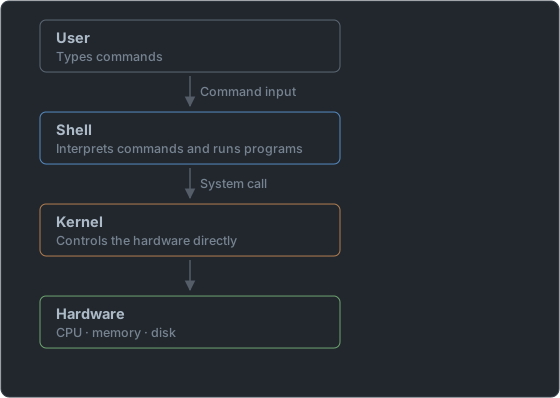
- The shell is a shell wrapped around the kernel. Users do not touch the kernel directly; they make requests through the shell.
- The shell does four main things: interpret commands, run programs, set up the environment, and run scripts.
- The shell is not part of the kernel but an ordinary application program. That is why you can swap it out.
How One Command Line Gets Executed
When you type ls -l /etc and press Enter, the following happens inside the shell, in order.
   1. Read      Receives the line you typed
   2. Split     Splits on whitespace into command (ls), option (-l), and argument (/etc)
   3. Expand    Replaces $variables, wildcards (*), and aliases with real values
   4. Look up   Checks whether it is a builtin; if not, searches PATH for an executable
   5. Execute   Creates a child process and runs that program
6. Wait Receives the exit status when it finishes and shows the prompt again- Because of step 3, in
ls *.txtit is the shell, notls, that replaces*with file names.lsjust receives the list of file names that has already been expanded. - Step 4 is where builtin commands and external commands diverge.
| Category | What it is | Examples | How to check |
|---|---|---|---|
| Builtin command | A command that is built into the shell itself. It does not create a new process | cd, echo, export, alias, history, exit | type cd |
| External command | A command that exists as a separate executable file on disk | ls, cp, cat, vi | which cat |
type cd
# cd is a shell builtin
type cat
# cat is /usr/bin/cat
type ls
# ls is aliased to `ls --color=auto'
There is a reason
cdis a builtin. Changing directories changes the shell's own current location, so a child process cannot do it on the shell's behalf. Even if the child moves, the parent shell stays where it was.
Branches of the Shell Family
                   Thompson shell (1971)
                          │
        ┌─────────────────┴─────────────────┐
        │                                   │
   Bourne shell (sh, 1977)            C shell (csh, 1978)
   Stephen Bourne                     Bill Joy
        │                                   │
   ┌────┴────┬──────────┐                  │
   │         │          │                  │
  ksh      bash       dash               tcsh
 (Korn)  (GNU, 1989)                    (improved)
   │         │
└────► zsh (absorbs features of ksh, bash, tcsh)| Shell | Meaning of the name | Creator | Family | Features |
|---|---|---|---|---|
| sh | Bourne shell | Stephen Bourne | Bourne | The first standard shell. Few features, but available everywhere |
| csh | C shell | Bill Joy | C | Syntax similar to the C language. Introduced history and aliases |
| tcsh | TENEX C shell | — | C | Improved csh. Command completion |
| ksh | Korn shell | David Korn | Bourne | sh-compatible plus csh features combined |
| bash | Bourne Again shell | Brian Fox | Bourne | The default Linux shell. A GNU project |
| zsh | Z shell | Paul Falstad | Bourne | Powerful autocompletion. The default shell on macOS |
| dash | Debian Almquist shell | — | Bourne | Light and fast. Used only for scripts |
Expect a question that tests the families. Only
cshandtcshare C family; all the others are Bourne family. It helps to remember that only the two with a "c" in their name are grouped separately.
What Each Shell Did Differently
The history of shells is easy to memorize if you read it as "who added the convenience features that earlier shells lacked." The order of appearance is sh (1977) → csh (1978) → ksh (1983) → bash (1989) → zsh (1990).
| Feature | sh | csh | tcsh | ksh | bash |
|---|---|---|---|---|---|
| History (command history) | ✕ | ○ | ○ | ○ | ○ |
| Alias | ✕ | ○ | ○ | ○ | ○ |
Job control (fg, bg) | ✕ | ○ | ○ | ○ | ○ |
| Command-line editing | ✕ | ✕ | ○ | ○ | ○ |
| Compatible with sh scripts | — | ✕ | ✕ | ○ | ○ |
- csh was the first shell to add history, aliases, and job control. If asked "which shell first introduced this feature," the answer is csh, not bash.
- csh's weakness is that its syntax differs from sh, so scripts are not compatible. This syntax difference is the practical line between the C family and the Bourne family.
- ksh kept sh syntax while bringing in csh's convenience features, and bash added ksh's strengths on top of that. That is why bash became the standard.
- The default prompt also follows the family. The Bourne family uses
$, the C family uses%, and in either one root gets#.
ls -l /bin/sh
# lrwxrwxrwx. 1 root root 4 ... /bin/sh -> bash     ← Red Hat family
# lrwxrwxrwx  1 root root 4 ... /bin/sh -> dash     ← Debian/Ubuntu
Modern Linux has no real Bourne shell.
/bin/shis a symbolic link to another shell. The Red Hat family points it at bash, and the Debian family points it at the lightweight dash. That is why dash is listed as "scripts only" in the table.
Creators and Names
The Level 2 exam asks directly who created each shell.
| Shell | Creator |
|---|---|
| sh | Stephen Bourne |
| csh | Bill Joy |
| ksh | David Korn |
| bash | Brian Fox |
- ksh comes from Korn's name, csh from the C language, and bash from Bourne Again (a reborn Bourne).
- The name bash is a pun, since it sounds like "born again."
Which Shell Are You Using?
echo $SHELL          # /bin/bash   ← login shell
echo $0              # -bash       ← the shell currently running
cat /etc/shells      # list of shells available on this system
which bash # /usr/bin/bash| Method | What it tells you |
|---|---|
echo $SHELL | The login shell (the shell set as the default) |
echo $0 | The shell currently running |
/etc/shells | The file listing available shells |
7th field of /etc/passwd | That user's login shell |
$SHELLand$0can differ. If you logged in with bash but then ranzshinside it,$SHELLis still/bin/bashwhile$0becomeszsh.
Checking It Yourself
cat /etc/shells
# /bin/sh
# /bin/bash
# /usr/bin/sh
# /usr/bin/bash
# /bin/tcsh
# /bin/zsh

grep "^user:" /etc/passwd
# user:x:1000:1000:Test User:/home/user:/bin/bash

ps -p $$
#     PID TTY          TIME CMD
# 2314 pts/0 00:00:00 bash/etc/shellslists shells as absolute paths, one per line. The list varies depending on which shells are installed.$$is the PID of the current shell. That makesps -p $$the most reliable way to check "which shell is running right now."- If the result of
echo $0starts with a hyphen, like-bash, it marks a login shell. A shell launched again from inside it shows up asbashwithout the hyphen. $SHELLis just a variable filled in at login from the/etc/passwdvalue. It does not change on its own when you run another shell.
Changing the Shell
chsh -s /bin/zsh          # set my login shell to zsh
chsh -s /bin/zsh alice    # set alice's login shell (root privileges)
chsh -l # list available shellschsh(change shell) edits the last field of/etc/passwd. It takes effect from the next login.- You can only change to a shell registered in
/etc/shells. - For accounts that should not be allowed to log in, give
/sbin/nologinor/bin/falseas the shell. This keeps the account but blocks logins.
   user:x:1000:1000:Test User:/home/user:/bin/bash
                                            └─┬─┘
                                              └── 7th field = login shell
Three Ways to Change It
| Method | Who can use it | Notes |
|---|---|---|
chsh -s shell [user] | The user (own shell), root (anyone's) | Regular users must confirm their password |
usermod -s shell user | root | The -s option of the command that edits account attributes |
Edit /etc/passwd directly | root | Edit the 7th field. One typo can lock out logins |
chsh -s /bin/zsh
# Changing shell for user.
# Password:
# Shell changed.
echo $SHELL
# /bin/bash        ← still unchanged. You must log in again for it to change
grep "^user:" /etc/passwd
# user:x:1000:1000:Test User:/home/user:/bin/zsh- The file changes immediately, but the current shell stays the same.
chshdoes not touch the running shell; it only edits the value to be used at the next login. - If you just want to try one out briefly, simply run
zsh. When youexit, you return to the original shell and/etc/passwdis unchanged. chsh -lis supported on the Red Hat family. The Debian family'schshdoes not have this option, so usecat /etc/shellsinstead.- To set the shell from the time you create the account, write it like
useradd -s /bin/zsh alice.
Shells That Block Login
| Shell | When someone tries to connect |
|---|---|
/sbin/nologin | Shows the message "This account is currently not available." and disconnects |
/bin/false | Disconnects immediately without saying anything |
grep nologin /etc/passwd | head -3
# bin:x:1:1:bin:/bin:/sbin/nologin
# daemon:x:2:2:daemon:/sbin:/sbin/nologin
# apache:x:48:48:Apache:/usr/share/httpd:/sbin/nologin- These accounts are system accounts used by services, not people. They only serve as the owner of a program, so there is no reason for them to log in.
- This is different from deleting the account (
userdel). The account and file ownership stay as they are, and only the login is blocked. - On the Debian family the path is
/usr/sbin/nologin.
Login Shells and Non-Login Shells
| Category | When | Configuration files read |
|---|---|---|
| Login shell | At login, su - | /etc/profile, ~/.bash_profile |
| Non-login shell | When opening a new terminal window | ~/.bashrc |
- This distinction changes which configuration files are read. The detailed order is covered three days from now.
- The difference between
suandsu -shows up here too. Adding the hyphen starts a login shell.
Tomorrow we cover the values the shell remembers: shell variables and environment variables.
📖 Glossary
- Shell : A program that interprets the user's commands and passes them to the kernel. The shell wrapped around the kernel.
- Bourne family : The shells that branched off from sh. ksh, bash, zsh, and dash belong here.
- C family : The shells that branched off from csh. Only two: csh and tcsh.
- bash : Bourne Again SHell. A GNU shell created by Brian Fox and the default shell on Linux.
- Login shell : The shell that runs at login. It is specified in the 7th field of
/etc/passwd. /etc/shells: A file containing the list of paths of shells that can be used on the system.chsh: The command that changes the login shell. It takes effect from the next login./sbin/nologin: A shell assigned to block logins. The account exists but cannot be connected to.
📝 Practice Questions
Click a choice to reveal the answer and explanation.
Question 1
Which of the following is the default shell on Linux and is short for Bourne Again SHell?
Question 2
Which of the following shells belongs to the C shell family?
Question 3
Who developed the Korn shell?
Question 4
Which of the following files contains the list of shells that can be used on the system?
Question 5
Which of the following commands changes a user's login shell?