Based on the SAP-C02 exam guideReport an error
SAP-C02· ProWeek 6 · Day 2~31 min read
Day 2 - AWS MGN Deep Dive: The Physics of Block-Level Replication, Comparison with DRS, and Migration Hub Orchestrator
The essential problem of server migration is just one: the server keeps writing even while you are copying its disk. If copying a 50TB disk takes 24 hours, by the time the copy finishes, the source and the copy differ by 24 hours' worth of changes. Catching up with this "last delta" is the technical challenge of cutover.
AWS Application Migration Service (MGN) solves this problem with Block-Level Continuous Replication. It copies the whole disk first, then tracks every change made afterward in real time and applies it to the AWS Staging Area. At the moment of cutover, the "last delta" is effectively down to seconds.
Today we go deep on MGN's kernel driver I/O interception mechanism, the clear difference between Test Cutover and Cutover, the shared engine with DRS, and finally Wave automation in Migration Hub Orchestrator.
The History of MGN: SMS → CloudEndure → MGN
You need to know the lineage of cloud migration tools to avoid the exam traps.
2014: AWS Server Migration Service (SMS) launched
      Specialized for VMware vCenter/Hyper-V environments
      Periodic snapshot-based replication (delta snapshots, incremental)
      Up to 50 VMs replicated concurrently

2016: CloudEndure Migration (Israeli startup CloudEndure)
      Owned block-level continuous replication technology
      Multi-cloud, multi-OS support

2019: AWS acquires CloudEndure (estimated $250M)
      Integrated with AWS accounts, introduced a free first-90-days policy

2021: AWS Application Migration Service (MGN) generally available
      CloudEndure's technology + AWS-native integration + new UX
      Announced end of new customer onboarding for SMS

2023: SMS officially shut down (existing customers advised to migrate to MGN)

Today: MGN = AWS's single standard server migration tool
       DRS = always-on DR service based on the same engine
⚠️ Trap: If SMS (Server Migration Service) or CloudEndure Migration appears in the answer choices on the exam, it is wrong. AWS's current recommendation is MGN, and SMS has been shut down. Do not confuse it with the "Server Migration Connector" (SMS's on-premises agent). Also, "CloudEndure Disaster Recovery" has now been rebranded as AWS DRS.
How MGN Works: What Kernel Driver I/O Interception Really Does
Why Block Level: The Limits of File-Level Replication
File-level replication (rsync, robocopy) walks the file system and identifies changed files.
Problems with file level:
- If a file is modified during copying, an inconsistent state is captured
- DB data files have open transactions during copying, so the files themselves are in an inconsistent state
- OS-dependent — Windows NTFS, Linux ext4, and xfs each need different tools
- Files that are locked (File Locking) cannot be copied
Block-level replication does not understand the file system. It replicates the raw sectors of the disk (512-byte or 4KB blocks) as they are. It is independent of OS, file system, and app type.
Kernel Driver I/O Interception: How It Works Internally
When you install the MGN Replication Agent, an I/O intercept driver is loaded into the OS kernel.
Linux environment (Block Device I/O):
App → File system (ext4/xfs) → VFS (Virtual File System) → Block I/O layer
                                                              ↑
                                                 MGN driver intercepts here
                                                 and captures every written block
                                                              ↓
                                                    TLS transfer to AWS
Windows environment (VSS + Block I/O):
App → NTFS → Windows I/O Manager
                    ↑
        MGN Filter Driver inserted (minifilter driver approach)
        Captures every write I/O Request Packet (IRP)
                    ↓
           TLS transfer to AWS
The Windows Filter Driver architecture is a layered driver model that Microsoft designed as the "I/O Stack." Each layer driver can modify or capture an IRP before passing it to the next layer. Antivirus, encryption, and DLP solutions use the same Filter Driver approach. MGN uses this standard extension point to capture all I/O at the kernel level, so there is no need to modify the app or the DB engine.
Block change tracking mechanism:
- Whether each block has changed is tracked with a bitmap
- Initial sync: entire bitmap = "changed" → every block is transferred
- Continuous replication: only changed blocks are marked in the bitmap → only those blocks are transferred
- Bandwidth is optimized with compression and deduplication of the transferred data
MGN's continuous replication is different from CDP (Continuous Data Protection). CDP records all I/O in a journal so you can restore to any point in time (Point-in-Time). MGN follows the current state and does not keep every history. Therefore "rolling back to yesterday's state with MGN" is not possible. If you need point-in-time restore, you must use MGN together with AWS Backup. DRS is the same — it recovers the state "a few seconds ago," not the state "at 3 PM yesterday."
Replication Agent Installation Requirements
| Item | Details |
|---|---|
| Supported Linux | RHEL 6.5+, CentOS 6.5+, Ubuntu 12.04+, Debian 8+, Amazon Linux 1/2, SUSE 11 SP3+ |
| Supported Windows | Windows Server 2008 R2+, 2012, 2016, 2019, 2022 |
| Memory | Minimum 2GB RAM (for running the agent) |
| Network | Port 443 (HTTPS) outbound → AWS Staging Area |
| IAM | IAM user for the Replication Agent (AWSApplicationMigrationAgentPolicy) |
| Bandwidth | Initial sync is bandwidth-intensive; throttling is possible (MB/s limit setting) |
# Install the MGN Replication Agent on Linux
wget -O ./aws-replication-installer-init.py \
  https://aws-application-migration-service-ap-northeast-2.s3.ap-northeast-2.amazonaws.com/latest/linux/aws-replication-installer-init.py

sudo python3 aws-replication-installer-init.py \
  --region ap-northeast-2 \
  --aws-access-key-id AKIAIOSFODNN7EXAMPLE \
  --aws-secret-access-key wJalrXUtnFEMI/K7MDENG/bPxRfiCYEXAMPLEKEY \
  --no-prompt
⚠️ Trap: The Replication Agent authenticates with IAM credentials. These credentials are used for the initial registration from the source server to the AWS MGN service. In production, instead of an IAM user's Access Key, the pattern is to store them in AWS SSM Parameter Store or Secrets Manager and have the script reference them. Also, after installing the Agent, port 1500 (replication data transfer with the Replication Server) and 443 (control plane) must be allowed in the source server's security group or firewall.
MGN Step by Step: Replication → Test Cutover → Cutover
Step 1: Initial Sync
It starts immediately after the Agent registers. The Staging Area (a t3.small EC2 + EBS sized to the source disk) is created automatically.
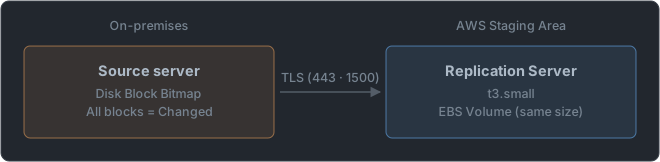
The source server keeps operating normally during the initial sync. New writes during this period are recorded in the bitmap and caught up by switching to continuous replication after the initial sync completes.
Estimating initial sync time:
Disk size 500GB, available bandwidth 100Mbps
= 500GB × 1024MB × 8bit / 100Mbps / 3600 seconds
= about 11.4 hours (15–20 hours expected in practice, including overhead and retransmission)

If bandwidth is throttled to 50Mbps:
= about 22.8 hours
Step 2: Continuous Replication
After the initial sync completes, only changed blocks are applied to Staging in real time.
Lag measurement: difference between source write time and Staging apply time
Typical Lag: under a few seconds
Lag during a write storm: tens of seconds to several minutes
Replication Status of each server in the MGN console:
- Not Started: Agent not installed
- Initial Sync: Initial sync in progress
- Healthy: Continuous replication normal (Lag within normal range)
- Stalled: Replication lag has worsened (network problem, Replication Server issue)
- Disconnected: Agent connection lost
Step 3: Test Cutover
Key difference: Test Cutover boots a test EC2 instance from the Staging data while the source server keeps running. The source is unaffected.
Test objectives:
1. Whether the OS boots correctly (kernel, driver compatibility)
2. Network settings (VPC subnet, security groups)
3. Whether the app runs correctly (service start scripts, dependencies)
4. Connectivity tests (RDS connection, S3 access, internal API calls)
5. Performance baseline (CPU, memory, disk I/O)

Test EC2 instance lifecycle:
Launch Test Instance → run tests → Terminate Test Instance
(Independent of Cutover, can be repeated)
The importance of Test Launch in large migration projects. A large Korean insurer tried to move a core system based on Oracle RAC with MGN. When they did a Test Launch after Initial Sync completed, the Oracle RAC clusterware (Grid Infrastructure) refused to start in the single EC2 instance environment. RAC is only for multi-node clusters, so it had to be reconfigured as single-instance Oracle. Without the Test Launch, this problem would have been discovered during the real Cutover; instead it was caught in advance. In MGN, Test Launch is a mandatory step you must not skip.
Step 4: Cutover (the Real Cutover)
Checklist that must be completed before Cutover:
- All functionality verified in Test Launch
- Network connectivity (SG, NACL, routing) verified
- Choose a time window with low bandwidth usage before Cutover (to minimize final sync time)
- Lower DNS TTL in advance (60 seconds or less)
- Rollback plan established (decide how long to keep the source server)
- Stakeholder communication completed
Cutover execution order:
1. Finalize Cutover request
   └── MGN performs the final changed-block sync
   └── Minimizing additional writes on the source server is recommended

2. EC2 instance creation
   └── Based on the Launch Template (instance type, AMI, SG, subnet)
   └── Staging EBS is attached to the new EC2

3. EC2 boots and app execution is verified

4. DNS switch
   └── Change the Route 53 / internal DNS record to the new EC2 IP

5. After confirming traffic to the source server has stopped, shut down/decommission it
Components of Cutover downtime:
Total downtime = final sync time + EC2 boot time + app start time + DNS propagation time
Typically: 2–10 minutes (depending on disk write speed and Lag)
The Cutover strategy is similar to the "Big Bang vs Trickle" pattern of database migration. MGN's Cutover is Big Bang (the whole switch at a specific point in time). To lower the risk of Big Bang, Test Launch + a Rollback plan + minimizing downtime are the key. DMS's CDC, on the other hand, is the Trickle pattern (gradual data transfer followed by a switch with minimal downtime).
MGN vs DRS: Same Engine, Different Purpose
AWS Elastic Disaster Recovery (DRS) uses the same block-level continuous replication engine as MGN, but its purpose is fundamentally different.
| Item | MGN | DRS |
|---|---|---|
| Purpose | Migration (one-time move) | Disaster recovery (always-on protection) |
| Source location | On-premises, other clouds, existing EC2 | On-premises, other clouds, other AWS Regions |
| Target | EC2 in the target AWS Region | EC2 in the DR AWS Region |
| Usage frequency | Ends after Cutover | Runs continuously (DR drills repeated) |
| RPO | N/A for migration purposes | A few seconds |
| RTO | Minutes at Cutover | Minutes (DR Drill/actual failover) |
| Drill method | Test Launch (source keeps running) | Non-Disruptive DR Drill (source keeps running) |
| Failback | No such concept (one-way move) | Supported (reverse replication from DR → source) |
| Cost model | Free for the first 90 days | Hourly charge per protected server (~$0.028/hour) |
DRS Failback scenario:
[Normal state]
On-prem server → DRS Agent → AWS DR Region Staging

[DR failover]
On-prem server fails → DRS boots EC2 in the DR Region (RTO minutes)
Service runs in the DR Region

[Failback after the source recovers]
DR Region EC2 → DRS Failback replication → on-prem server (reverse direction)
After the on-prem server is fully recovered → Failback Cutover
Service returns to the original on-prem server
🎯 Scenario: "We have finished migrating the on-premises data center to AWS. Now we want to use the same data center as the DR site for the AWS data." → AWS EC2 → DRS Agent → on-prem Staging. DRS also supports the reverse direction where the source is AWS EC2 and the DR target is on-premises. MGN cannot be used in this scenario (the relationship ends after the migration is complete).
A scenario that confuses DRS and MGN. "We want to use AWS as DR to protect on-prem servers" → DRS. "We want to move on-prem servers to AWS" → MGN. The key keywords of the question: "migration (one time)" vs "disaster recovery (continuous)."
DRS RPO/RTO Math
RPO calculation:
Typical DRS Replication Lag range: 1–5 seconds
RPO = Replication Lag ≈ a few seconds

Worst case (write storm):
If Lag grows to 60 seconds, RPO = 60 seconds

Monitoring: CloudWatch "ReplicationLagDuration" metric
Alarm: Lag > 30 seconds → SNS notification
RTO calculation:
For a DR Drill/actual failover:
1. Recovery Instance start: about 1–2 minutes (EC2 boot)
2. App service start: 1–5 minutes depending on the app
3. DNS switch: 0–300 seconds depending on TTL

Total RTO: about 5–15 minutes
DRS's Non-Disruptive DR Drill. Like MGN's Test Launch, it keeps the source server running while booting a Recovery Instance in the DR Region for testing. Terminating the Recovery Instance after the test does not affect replication from the source. It is a feature that solves the traditional DR drawback of "a DR drill = an actual service outage." Running regular DR Drills (once a quarter, four times a year) as Non-Disruptive drills to measure and verify RTO/RPO is a recommendation of the Well-Architected Reliability Pillar.
Migration Hub Orchestrator: Wave Automation
In large migrations (hundreds to thousands of servers), managing each server manually has its limits. Migration Hub Orchestrator handles per-Wave automation.
The Role of the Orchestrator
Migration Hub Orchestrator
    │
    ├── Choose a Workflow Template
    │   (SAP, SQL Server, Generic Server, etc.)
    │
    ├── Define Waves
    │   ├── Wave 1: Web/Cache servers with no dependencies
    │   ├── Wave 2: App/API servers (start after Wave 1 completes)
    │   └── Wave 3: DB servers (start after Waves 1+2 complete)
    │
    ├── Automate the steps of each Wave
    │   1. Pre-migration validation (network, permissions)
    │   2. Automatically trigger MGN Test Launch
    │   3. Automatically collect Test results
    │   4. Automate Cutover (or automatic after manual approval)
    │   5. Post-migration validation (Health Check)
    │   6. Automate DNS switch (Route 53 API calls)
    │
    └── Overall progress dashboard
Orchestrator Workflow structure:
# Migration Hub Orchestrator Workflow (conceptual YAML)
name: "Wave-1-WebServers"
steps:
  - name: "Pre-Migration Check"
    plugin: "MGN"
    action: "verify-replication-healthy"
    servers: ["web-01", "web-02", "web-03"]

  - name: "Test Launch"
    plugin: "MGN"
    action: "launch-test-instance"
    servers: ["web-01", "web-02", "web-03"]

  - name: "Manual Approval Gate"
    type: "approval"
    approvers: ["migration-team@example.com"]

  - name: "Cutover"
    plugin: "MGN"
    action: "finalize-cutover"
    servers: ["web-01", "web-02", "web-03"]

  - name: "DNS Switch"
    plugin: "Route53"
    action: "update-record"
    records: [...]
SK Telecom's large-scale MGN migration (2022–2023). While moving more than 500 servers from its on-prem data center to ap-northeast-2, SKT managed Waves with Migration Hub Orchestrator. They analyzed inter-server dependencies with ADS and organized them into 14 Waves, and the Orchestrator automated each Wave's Test Launch → approval → Cutover. Operational errors dropped by 60% compared with the previous approach (manual spreadsheet tracking).
Launch Settings and Post-Launch Actions
Launch Settings (Instance Configuration)
You predefine the specs of the EC2 instance that will be created at MGN Cutover.
| Setting | Description |
|---|---|
| Instance Type | Automatically recommended based on source CPU/memory, or specified manually |
| Subnet | Subnet in the target VPC |
| Security Group | Apply the SG that fits the app |
| IAM Instance Profile | IAM role to attach to the EC2 |
| EBS encryption | Specify a KMS key |
| Public IP assignment | False if it is a private subnet |
Right-Sizing strategy:
- At migration: set the same as or similar to the source specs (safe move)
- 2 weeks after the move: Compute Optimizer analyzes actual utilization
- After 2 weeks: downsize or change according to Compute Optimizer recommendations
Post-Launch Actions (Run Automatically After Cutover)
Right after a successful Cutover, you can automatically run an SSM Automation Runbook.
Cutover complete
    │
    ▼
Post-Launch Action 1: Verify SSM Agent installation
Post-Launch Action 2: Install + configure CloudWatch Agent (unified logging)
Post-Launch Action 3: Join the Active Directory domain
Post-Launch Action 4: Configure the NTP server (AWS internal NTP: 169.254.169.123)
Post-Launch Action 5: Run the app service start script
Post-Launch Action 6: Notify a Slack channel "Server X Cutover complete"
Automating Post-Launch Actions is the Day-2 Operations principle of Infrastructure as Code. Automating the initial setup (Bootstrap) right after a server starts guarantees a consistent state after migration. Completing the setup by manually using SSH/RDP on each server leads to omissions and inconsistency. It implements the same philosophy as Terraform's user_data or Ansible's post-migration playbook with SSM Automation.
MGN Cost Optimization
| Item | Cost | Optimization method |
|---|---|---|
| MGN service | Free for the first 90 days, then $0.062/server/hour | Plan Cutover within 90 days |
| Staging EC2 (t3.small) | ~$15/month/server | Remove the Agent from servers no longer in use |
| Staging EBS | $0.10/GB/month | Source disk size = EBS size |
| Data transfer (inbound) | Free | — |
| Test Instance | EC2 running time | Terminate immediately after testing |
Expected cost for 3 months with 100 servers, average disk 500GB:
MGN service: 90 days free = $0
Staging EC2 (t3.small × 100): $15 × 100 × 3 = $4,500
Staging EBS (500GB × 100): $0.10 × 500 × 100 × 3 = $15,000
Total: ~$19,500 (about 20 million KRW)

* Staging resources are automatically terminated after Cutover completes
📝 Practice Questions
Click a choice to reveal the answer and explanation.
Question 1
How does the MGN Replication Agent capture the disk I/O of an on-premises server?
Question 2
You are migrating a server with a 500GB disk using MGN. After Initial Sync completed, it entered the "Stalled" state. What is the most likely cause?
Question 3
What is the most important difference between Test Cutover and the real Cutover?
Question 4
Between DRS and MGN, which service fits the requirement "quickly recover on AWS when an on-premises server fails, and return the service to on-premises when the source recovers"?
Question 5
In a large migration (800 servers), you want to automatically manage dependency order between Waves and automate each Wave's Test Launch → manual approval → Cutover. Which service do you use?
Question 6
Select 3 answersWhich automation tasks are most commonly configured as MGN Post-Launch Actions? (Select all that apply)