Based on the MLA-C01 exam guideReport an error
MLA-C01· AssociateWeek 2 · Day 1~30 min read
Day 1 - Data Collection: S3 Data Lake, Kinesis, Batch Ingestion, Data Formats
📌 Key Takeaways
- S3 is the single source of truth for ML data. Training, ETL, and queries all use S3 as their input and output.
- A data lake is layered into Raw → Cleaned → Curated zones (the medallion architecture). Never overwrite the original.
- For real-time ingestion use Kinesis — minimal management + loading into S3 means Firehose, low latency + multiple consumers means Data Streams.
- For batch ingestion use DataSync (files), DMS (DB replication/CDC), Transfer Family (SFTP), Snowball (when the network line is impractical).
- The default training data format is Parquet — being columnar, it reads only the columns you need, compresses well, and is splittable.
S3: The Center of an ML Data Lake
The first gateway of a machine learning pipeline is "where and how do we bring in the data?" MLA-C01 Domain 1 (Data Preparation) accounts for roughly 28% of the whole exam, and its starting point is ingestion.
On AWS, the de facto single source of truth for ML data is Amazon S3. SageMaker training jobs, Glue ETL, and Athena queries all use S3 as input and output. There are three reasons.
- Practically unlimited capacity: Up to 5TB per object, with no limit on the number of objects per bucket. It can hold even petabyte-scale training data.
- Separation of compute and storage: Keep the data in S3 and attach SageMaker/EMR/Glue compute only when needed. Cost is proportional to usage.
- Broad integration: Almost every AWS analytics/ML service reads and writes S3 natively.
A data lake is usually layered into zones.
| Zone | Alias | Content | Format | Overwrite |
|---|---|---|---|---|
| Raw | Bronze / Landing | Data ingested exactly as the original | Original (JSON, CSV, logs) | Never allowed |
| Cleaned | Silver | Cleansed and validated data | Parquet | Regenerated by reprocessing |
| Curated | Gold | Feature engineering complete, right before training | Parquet | Regenerated by reprocessing |
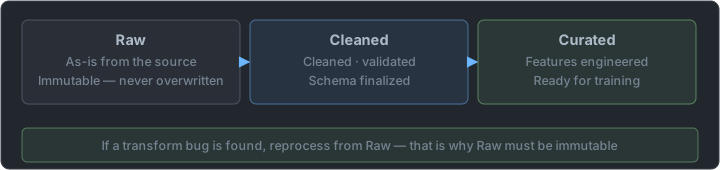
This Bronze/Silver/Gold layering is the Medallion Architecture popularized by Databricks. The core idea is "never overwrite the original, and preserve each transformation step in a separate zone." That way, when a bug is found in the transformation logic you can go back to Raw and reprocess, and data lineage becomes easy to trace. It is a pattern that enforces immutability at the level of data layout.
S3 storage classes also matter in an ML context.
| Class | Use in ML |
|---|---|
| S3 Standard | Active datasets used frequently for training |
| S3 Intelligent-Tiering | Data with irregular access patterns (automatic tier movement) |
| S3 Glacier family | Historical data kept for regulatory retention, for the occasional retraining |
import boto3

s3 = boto3.client("s3")

# Upload training data (curated zone)
s3.upload_file(
    Filename="train.parquet",
    Bucket="ml-datalake-prod",
    Key="curated/customer-churn/year=2026/month=06/train.parquet",
)
The year=2026/month=06/ part of the Key above is exactly Hive-style partitioning. Athena and Glue read this key=value directory structure and recognize partitions automatically. Partitioning is covered in depth on Day 4.
Kinesis: Real-Time Streaming Ingestion
When batch is not enough — clickstreams, IoT sensors, real-time fraud detection — use the Kinesis family. The exam checks whether you can tell the uses of the four variants apart precisely.
| Service | Use | Key feature |
|---|---|---|
| Kinesis Data Streams (KDS) | Low-latency custom stream processing | Shard-based, data retention 1–365 days, consumers process directly |
| Kinesis Data Firehose | Load a stream → storage (S3/Redshift/OpenSearch) | Fully managed, serverless, near-real-time (buffered) |
| Kinesis Data Analytics | Real-time SQL/Flink analytics over streams | Window aggregation |
| Kinesis Video Streams | Video stream ingestion | Input to ML vision pipelines |
KDS vs Firehose — this is where the exam splits answers most often.
| Criterion | Kinesis Data Streams | Kinesis Data Firehose |
|---|---|---|
| What you manage | Adjust the shard count yourself | Nothing (serverless) |
| Latency | Can be under 1 second | Buffered (near-real-time) |
| Consumers | Multiple apps consume independently, each with its own offset | Loads into one designated destination |
| Replay | Possible within the retention period | Not possible |
| Destination | You implement it | S3, Redshift, OpenSearch, etc. |
| Typical correct-answer phrasing | "low latency", "multiple consumers", "custom processing" | "minimal management overhead", "load into S3 without code" |
A widely used combination for ML data ingestion is KDS → Firehose → S3, or simply Firehose → S3. Firehose drops data into S3 as a batch according to whichever comes first: the buffer size (e.g., 5MB) or the buffer time (e.g., 60 seconds).
import boto3, json

firehose = boto3.client("firehose")

firehose.put_record(
    DeliveryStreamName="clickstream-to-s3",
    Record={"Data": json.dumps({"user": "u123", "event": "click"}) + "\n"},
)
[Producer] ──> [KDS shards 1..N] ──┬──> [Real-time dashboard app] (each with its own offset)
├──> [ML feature pipeline]
└──> [Firehose] ──buffering──> [S3 data lake]
KDS sets throughput by the shard. Each shard gives 1MB/s of writes (or 1,000 records/s) and 2MB/s of reads. If throughput is insufficient, you have to add shards (resharding). Firehose, on the other hand, is serverless so there is no shard management, but it is buffered "near-real-time" rather than "real-time".
Kinesis follows the distributed log abstraction. The open-source equivalent of the same paradigm is Apache Kafka. The key idea is to write data in order to an append-only log, and have multiple consumers each hold their own offset (checkpoint) and read independently. Thanks to this, a single stream can be consumed by a real-time dashboard and an ML feature pipeline at the same time.
Batch Ingestion: DataSync, Transfer Family, DMS, Glue
Most ML data that does not need real-time is ingested in batches.
| Service | Source → Target | Use | Answer keyword |
|---|---|---|---|
| AWS DataSync | On-premises NFS/SMB → S3/EFS | One-time or periodic migration of large file volumes | "file server synchronization" |
| AWS Transfer Family | SFTP/FTPS client → S3 | A partner sends data over SFTP | "the vendor uploads via SFTP" |
| AWS DMS | Relational DB (RDS/on-premises) → S3/Redshift | Replicate DB data for analytics/ML | "CDC", "continuous DB replication" |
| AWS Glue (batch ETL) | Various sources → S3 | Scheduled ingestion including transformation (Day 2) | "load while transforming" |
| Snowball/Snowmobile | Petabyte-scale physical transfer | Scale that is impractical over the network | "the line is slow · hundreds of TB" |
A worked example — "100TB on-premises to S3, over a 100Mbps internet line." Sending 100TB at 100Mbps takes about 92 days. In this case Snowball (shipping a physical device) is the answer. If the line is sufficient, DataSync. DMS is the answer when the keyword is "continuous replication of a relational DB (CDC, Change Data Capture)."
Data Formats: Parquet vs CSV vs JSON
This decision determines ML training performance and cost. The exam covers it.
| Format | Storage layout | Compression | Schema | Splittable | Suited for |
|---|---|---|---|---|---|
| CSV | Row-based | Weak | None | Yes if uncompressed | Small scale, human reading |
| JSON | Row-based | Weak | Flexible (nested) | Yes if JSON Lines | Semi-structured data, API responses, logs |
| Parquet | Columnar | Strong (Snappy/GZIP) | Built in | Yes (row groups) | Large-scale ML/analytics |
| ORC | Columnar | Strong | Built in | Yes | Hive ecosystem |
| Avro | Row-based | Medium | Built in (supports evolution) | Yes | Streaming, schema evolution |
Why Parquet is the default choice for ML:
- Columnar storage: You only read the feature columns needed for training, so I/O drops sharply. If you use 5 of 100 columns, only 5 are scanned.
- Per-column compression: Values of the same type sit next to each other, so the compression ratio is high. Typically 2–10x smaller than CSV.
- Predicate pushdown: When Athena/Spark needs "only this partition, only this value," it skips unnecessary data blocks.
- Built-in schema: Type information lives in the file, so no separate schema file is needed.
[Row-based CSV]      Row 1: a,b,c,...,z │ Row 2: a,b,c,...,z │ ...
                     → Even if you need only 3 of 26 columns, it reads everything

[Columnar Parquet]   column a block │ column b block │ column c block │ ... │ column z block
                     → Reads only the 3 needed blocks + per-column compression
import pandas as pd

# CSV → Parquet conversion (Snappy compression)
df = pd.read_csv("raw/transactions.csv")
df.to_parquet("curated/transactions.parquet", compression="snappy", index=False)
Columnar storage is optimized for OLAP (analytical) workloads. A typical analytical query is "an aggregation over millions of rows × a handful of columns," and row-based storage has to read even the columns it does not need from disk. Columnar storage stores columns separately so it reads only what it needs, and because the same type sits adjacent, run-length/dictionary encoding also gives a high compression ratio. Conversely, OLTP (transactional) work often handles "an entire row" at a time, so row-based is advantageous. ML training is mostly OLAP in nature, so Parquet fits.
⚠️ Trap: JSON is easy for humans to read and strong for nested structures, but it is inefficient as a training data format. It is text, so it is large, it costs parsing time every time, and column-level skipping is impossible. Even if you receive JSON in the Raw zone, the standard pattern is to convert it to Parquet on the way to the Cleaned/Curated zones.
Choosing an Ingestion Path
How does the data arrive?
   │
   ├─ It flows in continuously (streaming)
   │    ├─ Just pile it into S3 with no code → Firehose
   │    ├─ Sub-second processing + multiple apps consume → Kinesis Data Streams
   │    ├─ SQL aggregation needed on the stream → Kinesis Data Analytics
   │    └─ Video stream → Kinesis Video Streams
   │
   └─ It arrives periodically in chunks (batch)
        ├─ On-premises file server → DataSync
        ├─ Partner uploads via SFTP → Transfer Family
        ├─ Continuous replication of a relational DB (CDC) → DMS
        ├─ Transformation included → Glue ETL
        └─ Would take months over the line → Snowball
Calculating the Ingestion Method from Throughput
The exam often throws out numbers and asks "is this method feasible?" You only need to learn two calculation patterns.
① Transfer time versus line speed — decides whether to use Snowball in a batch migration.
| Data volume | Line | Approx. time | Verdict |
|---|---|---|---|
| 1TB | 1Gbps | A few hours | Online transfer (DataSync) |
| 10TB | 1Gbps | About a day | Online transfer possible |
| 100TB | 100Mbps | About 3 months | Snowball |
| 200TB | 50Mbps | Over a year | Snowball |
② Shard count versus stream throughput — Kinesis Data Streams capacity design.
- 1 shard: 1MB/s writes (or 1,000 records/s), 2MB/s reads
- To write 5MB per second you need at least 5 shards
- If throughput falls short, you need resharding to add shards, and this is an operational burden
⚠️ Trap: When the condition "minimize operational overhead" is attached, serverless Firehose has the edge over Data Streams, where you have to manage shards yourself. Conversely, if the condition is "latency under 1 second" or "multiple apps each consume the same stream," Firehose will not do.
Zone Design and Lifecycle Policies
Each zone of a data lake has a different access frequency, so you give each a different storage class.
| Zone | Access frequency | Recommended class | Reason |
|---|---|---|---|
| Raw | Only when reprocessing | Standard → Intelligent-Tiering | Rarely read, but you never know when it will be needed |
| Cleaned | Medium | Standard | Starting point for reprocessing |
| Curated | Repeated on every training run | Standard | The cost of repeated reads dominates |
| Retention snapshots | Almost never | Glacier family | Regulatory compliance, lookups are rare |
- A lifecycle policy can automatically move old Raw objects to a lower-cost tier.
- However, if you move Curated data that training reads repeatedly down to an archive tier, retrieval latency and restore cost actually grow.
What Is Worth Deciding Up Front at Ingestion
| Decision | Problem that arises if postponed |
|---|---|
| Partition key (usually date) | Repartitioning later means rewriting everything |
| Immutability rule for the Raw zone | The original gets overwritten and the reprocessing path disappears |
| Storage format (when to switch to Parquet) | Using Raw directly for training makes I/O cost accumulate |
| Schema change policy | The crawler splits the table or columns disappear |
| Handling of personal-data columns | Masking later means sweeping every zone |
In the next note we look at how to catalog the ingested data with AWS Glue and transform it with ETL.
📖 Glossary
- Data lake: A storage approach that gathers structured and unstructured data in one place exactly as the original and interprets it at read time. S3 is at the center.
- Single source of truth (SSOT): One designated reference store so that multiple systems see the same data.
- Medallion architecture: A design that divides zones into Raw (Bronze) → Cleaned (Silver) → Curated (Gold) to preserve the original.
- Data lineage: The history of where this data came from and what transformations it went through.
- Shard: The throughput unit of Kinesis Data Streams. Adding shards increases throughput and also increases what you have to manage.
- Firehose buffering: A method that flushes to the destination all at once when the buffer size or time condition is met first. That is why it is near-real-time.
- CDC (Change Data Capture): A replication method that captures only the changes in the source DB and keeps streaming them to the target. A DMS keyword.
- Columnar storage: A method that stores values grouped by column rather than by row. You can read only the columns you need.
- Predicate pushdown: An optimization that pushes filter conditions down to the storage layer so unnecessary blocks are not read at all.
- Splittable: The property that a single file can be divided and read by multiple workers. It governs parallel processing speed.
📝 Practice Questions
Click a choice to reveal the answer and explanation.
Question 1
A team wants to collect website clickstream data and load it to S3. They want to minimize infrastructure management burden while storing in S3 near-real-time. What is the most suitable service?
Question 2
For a dataset with 100 columns and 5TB size, only 5 columns are used in ML training. What storage format minimizes I/O cost and scan volume during training?
Question 3
An on-premises data center has 200TB of training images, and the internet connection is 50Mbps. What is the most practical way to move this data to S3?
Question 4
Building an ML data lake, you want to safely preserve original data while tracking transformation stages. What is the most appropriate design principle?
Question 5
Which scenario is better suited for Kinesis Data Streams than Kinesis Data Firehose?