Based on the Linux Master 2 exam syllabusReport an error
Linux Master 2· AssociateWeek 6 · Day 3~21 min read
Day 3 - Process Concepts and Types
📌 Key Points
- A program is a file on disk, and a process is that program loaded into memory and running.
- Every process has a PID (its own number) and a PPID (its parent's number).
- The ancestor of every process is PID 1 — formerly init, now systemd.
- A foreground process holds the screen, and a background process runs behind the scenes. To send one to the background, add
&at the end of the command. - A daemon is a process that waits in the background to provide a service. Its name usually ends in
d—httpd,sshd.
Programs and Processes
| Category | Where it lives | State |
|---|---|---|
| Program | Disk | A file, before it is run |
| Process | Memory | The state of being run |
- Multiple processes can be created from a single program. If you open three terminal windows, there are three bash processes.
- Each process gets a unique number (PID).
ls -l /usr/bin/bash
# -rwxr-xr-x. 1 root root 1150584 ... /usr/bin/bash     ← program: one file on disk

ps -e | grep bash
#    2314 pts/0    00:00:00 bash                        ← process: two running right now
# 2850 pts/1 00:00:00 bash- There is one file but two processes. A process is "each individual run of a program."
- PIDs are assigned in order of creation, and when a process ends, its number is reused later. Even if you run the same program again, the PID differs.
- The kernel shows information about running processes in the
/proc/PID/directories. That is whyls /procshows lots of directories with numeric names.
Parent and Child
   systemd  (PID 1)
      │  fork
      ├── sshd
      │     └── bash        ← the shell I logged in with
      │           ├── vi
      │           └── ls
└── crond| Term | Meaning |
|---|---|
| PID | The process's own number |
| PPID | The number of the parent process |
| fork | The parent duplicates itself to create a child |
| exec | Turning into a different program in place |
- When you run a command in the shell, the shell creates a child with fork, and that child becomes the command with exec.
- PID 1 is the ancestor of all processes. The kernel starts it first at boot.
| Era | PID 1 |
|---|---|
| Formerly | init |
| Now | systemd (or upstart) |
ps -ef | head -3
# UID          PID    PPID  C STIME TTY          TIME CMD
# root           1       0  0 09:00 ?        00:00:02 /usr/lib/systemd/systemd
# root 2 0 0 09:00 ? 00:00:00 [kthreadd]- The PPID of PID 1 is 0. It means the kernel started it directly rather than a person launching it.
- Names wrapped in square brackets (
[kthreadd]) are kernel threads. They are not programs run from disk but workers inside the kernel. - On distributions that use systemd,
/sbin/initis a symbolic link to systemd. The name remains but the substance has changed.
Seeing fork and exec for Yourself
echo $$            # 2314     ← PID of the current shell
bash               # launch a child shell
echo $$            # 2901     ← got a new PID
echo $PPID         # 2314     ← the parent is the shell we just left
exit # end the child and return to the parent| Category | fork | exec |
|---|---|---|
| PID | Gets a new number | Stays the same |
| Original process | Remains as the parent | Is overwritten and disappears into the new program |
| Process count | Increases by one | Unchanged |
- When the shell runs
ls, it makes a copy of itself with fork, and that copy becomeslswith exec. That is why the shell is still there afterlsfinishes. - If you type
exec lsin the terminal, the shell itself turns intolswithout a fork. Whenlsends there is no shell to return to, so the terminal closes.
Two Abnormal States
| State | What it is |
|---|---|
| Orphan process | A child whose parent died first. PID 1 adopts it |
| Zombie process | A state where the child has ended but the parent has not collected its exit status |
- A zombie is a process that has already ended. It uses neither CPU nor memory and only occupies a slot in the process table. In
psits state appears asZ. - A zombie cannot be killed directly. It is already dead. Terminate the parent and PID 1 cleans it up.
ps -ef | grep defunct
# user 3120 3100 0 10:15 pts/0 00:00:00 [myapp] <defunct>- When a child ends, the kernel keeps "how it ended" (the exit status) until the parent collects it. That held state is the zombie.
psshows it as<defunct>. - So every process passes briefly through a zombie state when it ends. If the parent collects it right away, you do not notice it. The problem is when the parent does not collect it and the zombie stays.
- In the output above, the zombie's PID is 3120 and its parent is 3100. The thing to deal with is 3100, not 3120.
| Category | Orphan process | Zombie process |
|---|---|---|
| Which side ended first | The parent | The child |
| State of the child | Alive and running | Already ended |
| Resources used | Same as a normal process | Only one slot in the process table |
In ps | PPID changes to 1 | State Z, <defunct> |
| Action | None needed — PID 1 takes over and collects it when it ends | Make the parent collect it, or terminate the parent |
- An orphan is a process that is working normally. Only its parent has changed. A zombie, by contrast, is an empty shell that does no work.
- The exam answer is "PID 1 adopts it." On recent distributions, the systemd process that manages the user session may become the new parent instead, so the PPID can show a value other than 1.
- A single zombie is harmless, but if they keep piling up they use up all the PIDs and new processes can no longer be created.
Foreground and Background
| Category | Character |
|---|---|
| Foreground | Runs holding the terminal. You cannot type other commands until it finishes |
| Background | Runs behind the scenes. You can type the next command immediately |
sleep 100 &          # to the background from the start
jobs                 # list background jobs
fg %1                # bring job 1 to the foreground
bg %1 # send job 1 to the background| Action | What it does |
|---|---|
& | Add at the end of a command to run in the background |
Ctrl+Z | Pause the running job |
Ctrl+C | Terminate the running job |
jobs | View the job list |
fg | Switch to the foreground |
bg | Resume a stopped job in the background |
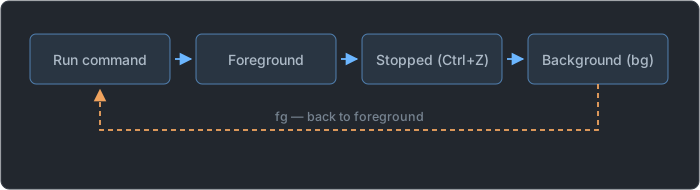
Ctrl+Zis stop andCtrl+Cis terminate. Do not mix the two up.- If you add
nohup, it keeps running even after you close the terminal —nohup command &.
Reading jobs Output
sleep 300 &
# [1] 3301                          ← [job number] PID
vi memo.txt                         # press Ctrl+Z while editing
# [2]+  Stopped                 vi memo.txt
jobs
# [1]-  Running                 sleep 300 &
# [2]+  Stopped                 vi memo.txt
jobs -l
# [1]-  3301 Running                 sleep 300 &
# [2]+  3305 Stopped                 vi memo.txt
fg                                  # if you omit the number, the job marked + (vi) comes
kill %1 # terminate by job number| Marker | Meaning |
|---|---|
[1] | Job number — valid only inside that shell |
3301 | PID — valid system-wide |
+ | Current job — the target of fg and bg when no number is given |
- | The next job in order |
Running / Stopped / Done | Running / stopped / finished |
- Add
%to a job number.kill 1sends a signal to PID 1, whilekill %1sends a signal to job 1. They are entirely different targets. jobsshows only the jobs launched by the current shell. Find ones run in other terminals withps.- A job stopped with
Ctrl+Zis not finished. It remains in the list asStopped, and it runs again only afterbg.
Keys and Signals
| Key | What goes to the process | Result |
|---|---|---|
Ctrl+C | SIGINT (2) | Terminate |
Ctrl+Z | SIGTSTP (20) | Stop — it can be resumed |
Ctrl+\ | SIGQUIT (3) | Terminate |
Ctrl+D | Not a signal — end of input (EOF) | Logout in a shell |
The Difference Between & and nohup
nohup ./backup.sh &
# [1] 3410
# nohup: ignoring input and appending output to 'nohup.out'| How it is run | Does it hold the terminal? | When the terminal is closed |
|---|---|---|
command | Holds it | Terminated |
command & | Does not hold it | May be terminated |
nohup command & | Does not hold it | Keeps running |
- When the terminal closes, SIGHUP (1) goes to the processes launched from it.
nohup(no hang up) makes them ignore this signal so that they survive. nohupalone does not make it a background job. Sending it to the background is&'s job, so the two are used together.- Since the screen goes away, the output accumulates in a
nohup.outfile in the current directory. - Even for a background job, its output is still printed on the terminal. To keep it from mixing in, redirect to a file like
command > out.log 2>&1 &.
Daemon Processes
- It is a service process that waits in the background for requests. It is not attached to a terminal.
- By convention its name ends in
d.
| Daemon | What it does |
|---|---|
httpd | Web server |
sshd | Remote access (SSH) |
crond | Scheduled tasks |
syslogd | Log recording |
ftpd | File transfer |
named | DNS |
ps -ef | grep -E "sshd|crond"
# root        1023       1  0 09:00 ?        00:00:00 /usr/sbin/sshd -D
# root 1045 1 0 09:00 ? 00:00:00 /usr/sbin/crond -n- The TTY column is
?. It means there is no connected terminal, and it is the sign for recognizing a daemon. A process I launched from a terminal shows up likepts/0. - The PPID is 1. It was not launched by a user logging in; PID 1 started it at boot.
- Ending in
dis only a convention, not a rule. There are daemons that do not end ind, such asnginxandsendmail, and converselyfind,pwd, anduseraddend indbut are not daemons.
| Category | Background process | Daemon |
|---|---|---|
| Who launches it | The user, with & | The system, at boot |
| Terminal | Connected (pts/0) | None (?) |
| When it ends | When the work finishes or the terminal closes | Until the system shuts down or stops it |
- On distributions that use systemd, daemons are handled like
systemctl start sshdandsystemctl stop sshd. The older way wasservice httpd start.
Two Ways Daemons Run
| Method | Character |
|---|---|
| standalone | Always resident in memory, waiting. Fast response. Suitable for frequently used services |
| inetd (xinetd) | A super daemon waits on its behalf and launches it only when a request arrives. Saves memory |
- Standalone is fast but uses more memory; the inetd method is slower but saves memory. This trade-off appears on the exam.
xinetdis an improvement oninetd, with added access control features.- Web and SSH, with frequent requests, suit standalone, while something used only occasionally, such as telnet, suits the inetd method.
   standalone          request ───────────────────►  httpd (always running)

   inetd method        request ──►  xinetd (always running)  ──►  in.telnetd (launched then)
└ guards the doors of many services alone| Category | inetd | xinetd |
|---|---|---|
| Configuration | A single /etc/inetd.conf file | /etc/xinetd.conf + /etc/xinetd.d/, which holds per-service files |
| Access control | No built-in feature | Has a built-in feature |
   # /etc/xinetd.d/telnet
   service telnet
   {
           disable         = no
           socket_type     = stream
           wait            = no
           user            = root
           server          = /usr/sbin/in.telnetd
   }
disable = nomeans "enabled." It is a double negative, "disabling = no," so it is confusing. If it isdisable = yes, that service is off.- The super daemon itself (xinetd) runs as standalone. It must stay up at all times to wait for the other services on their behalf.
- The name "super daemon" comes from the fact that it oversees many daemons and wakes them on their behalf. It does not mean it has higher privileges.
Tomorrow we cover the commands for seeing and handling these processes:
ps,top,kill, and job scheduling.
📖 Glossary
- Process : A program that has been run and loaded into memory.
- PID / PPID : The process's own number / the parent process's number.
- fork : The action in which a parent process duplicates itself to create a child process.
- Orphan process : A child process whose parent terminated first. PID 1 adopts it.
- Zombie process : A process that has terminated but remains in the table because the parent has not collected its exit status.
- Foreground / background : Runs holding the terminal / runs behind the scenes.
- Daemon : A process that waits in the background for service requests. Its name mostly ends in
d. - standalone / inetd : The method of keeping a daemon always resident / the method where a super daemon launches it when needed.
📝 Practice Questions
Click a choice to reveal the answer and explanation.
Question 1
Which of the following is a process that remains only in the process table because its parent has not collected its exit status?
Question 2
Which of the following is the PID 1 process that is the ancestor of all processes on Linux?
Question 3
Which of the following symbols do you add at the end of a command to run it in the background from the start?
Question 4
Which of the following key combinations pauses a running foreground job?
Question 5
Which of the following execution methods keeps a service daemon always resident in memory so it can respond quickly to requests?