Based on the Linux Master 2 exam syllabusReport an error
Linux Master 2· AssociateWeek 11 · Day 2~31 min read
Day 2 - Virtualization
📌 Key Takeaways
- Virtualization is a technology for running multiple operating systems at the same time on one physical computer.
- Full virtualization does not require modifying the guest OS, while paravirtualization requires modifying the guest OS.
- Hypervisors come in two types — Type 1 (directly on the hardware) and Type 2 (on top of an operating system).
- VirtualBox is Oracle's Type 2 product, released under the GPL, and uses full virtualization.
- VirtualBox supports VMware's VMDK and Microsoft's VHD images.
What Is Virtualization
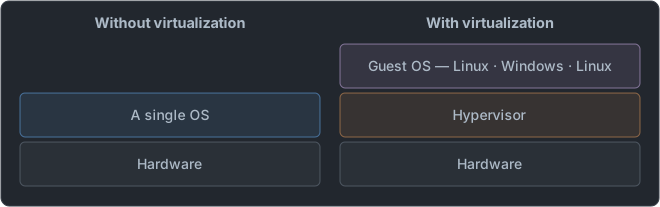
- The hypervisor divides up the hardware and allocates it to each virtual machine.
- The physical computer is called the host, and the virtual computers on it are called guests.
- A hypervisor is also called a VMM (Virtual Machine Monitor). It is another name for the same thing.
| Name | What it refers to | Example |
|---|---|---|
| Host OS | The operating system installed directly on the physical computer | Windows on my laptop |
| Guest OS | The operating system installed inside a virtual machine | Linux installed inside it |
| Virtual machine (VM) | One set of fake hardware created by the hypervisor | One machine with 2 CPUs, 4GB of memory, and a 20GB disk |
| Disk image | A single file on the host that acts as the guest's hard disk | rocky9.vdi |
- A guest's disk is ultimately a file on the host. That is why virtual machines are easy to copy, back up, and move, and the format of this file (VDI, VMDK, VHD) differs by product, which is why it appears on the exam.
| What virtualization gives you | Explanation |
|---|---|
| Server consolidation | Gathers several idle servers onto one physical machine to reduce wasted resources |
| Isolation | If one guest breaks, other guests and the host are unaffected |
| Snapshots | Save the state at some point and roll back to it later |
| Portability | Just move the image file and boot it as is on another machine |
- Snapshots are the reason we recommended "install it in a virtual machine if it's for study" in week 2. Even if you partition wrongly, you can just roll back.
The Two Types of Hypervisors
| Category | Type 1 (native, bare-metal) | Type 2 (hosted) |
|---|---|---|
| Location | Directly on the hardware | On top of an operating system |
| Performance | Good | Relatively lower |
| Use | Servers, data centers | Personal PCs, testing |
| Examples | Xen, KVM, VMware ESXi, Hyper-V | VirtualBox, VMware Workstation |
- Type 1 acts as an operating system itself. That is why it is fast.
- Type 2 is installed like a program on top of an already installed operating system. It is easy to install, so it is used for personal use.
      Type 1 (native)                   Type 2 (hosted)

   Guest OS    Guest OS             Guest OS    Guest OS
   ─────────────────────            ─────────────────────
       Hypervisor                       Hypervisor      ← just one more program
   ─────────────────────            ─────────────────────
        Hardware                        Host OS         ← one extra layer
                                    ─────────────────────
Hardware- The deciding question is "what is underneath the hypervisor?" Hardware means Type 1; an operating system means Type 2.
- The reason Type 2 is slower is the one extra layer in the diagram. A guest's request goes through the hypervisor and then through the host OS once more before reaching the hardware.
- KVM is where people get confused. You install Linux first and then use it, so it looks like Type 2, but once the module is loaded, the Linux kernel itself acts as the hypervisor, so it is classified as Type 1. The exam follows this classification.
- Products from the same company exist on both sides — VMware ESXi is Type 1, VMware Workstation is Type 2. Choosing by the name "VMware" alone will get you the wrong answer.
Full Virtualization and Paravirtualization
| Category | Full virtualization | Paravirtualization |
|---|---|---|
| Guest OS modification | Not needed | Needed |
| Method | Imitates the hardware as is | The guest requests directly from the hypervisor |
| Performance | Average (improves with hardware support) | Good |
| Hardware support | Uses Intel VT-x / AMD-V | — |
| Representative | VirtualBox, VMware, KVM | Xen (early versions) |
The deciding criterion is "must the guest OS be modified?" Full virtualization works as is, without modification, while paravirtualization requires modification. In exchange, paravirtualization is faster.
- Intel VT-x and AMD-V are CPU features that assist virtualization. Thanks to them, full virtualization's performance improved greatly, and full virtualization is now the mainstream.
- Xen started out with paravirtualization but now supports full virtualization as well.
Why Must the Guest Be Modified
Operating systems are built on the belief that they have the hardware all to themselves. When several such operating systems run on one computer, someone has to direct traffic.
   Full virtualization                   Paravirtualization

   Guest OS: "I write to the disk        Guest OS: "Hypervisor, please write this"
        directly"                             │  (knows it is a virtual machine)
        │  (doesn't know it is a VM)          ▼
        ▼                                Requests directly via a hypercall
   The hypervisor intercepts the command  → no intercepting or imitating step
   and imitates the real hardware to
handle it| Question | Full virtualization | Paravirtualization |
|---|---|---|
| Does the guest know it is a virtual machine? | No | Yes |
| How it asks the hypervisor to do work | Issues commands as usual → the hypervisor intercepts them | Requests directly with hypercalls |
| Can an OS that can't be modified (such as Windows) run? | Yes | Difficult (the kernel must be modified) |
| Why slow / why fast | The cost of intercepting and imitating | Skips that process |
- The third row is why paravirtualization, despite being fast, did not become the mainstream. An operating system whose source cannot be modified cannot be run.
- As the CPU began to help directly with the interception (Intel VT-x, AMD-V), full virtualization's weakness shrank. This approach of getting help from the CPU is called hardware-assisted virtualization.
On Linux, you check whether the CPU has this feature in /proc/cpuinfo.
grep -E -c 'vmx|svm' /proc/cpuinfo
# 4| Flag | Meaning |
|---|---|
vmx | Supports Intel VT-x |
svm | Supports AMD-V |
- The printed number is the count of logical CPUs where the flag appears. The example above means all 4 cores support it, and 0 means hardware-assisted virtualization cannot be used in that environment.
- Questions swap the flag name and the company. vmx is Intel, svm is AMD.
Features by Product
| Product | Made by | Type | Features |
|---|---|---|---|
| VirtualBox | Oracle | Type 2 | Released under GPL. Free. Full virtualization |
| VMware Workstation | VMware | Type 2 | Commercial. For personal use |
| VMware ESXi | VMware | Type 1 | For servers |
| KVM | Open source | Type 1 | Built into the Linux kernel |
| Xen | Open source | Type 1 | The representative of paravirtualization |
| Hyper-V | Microsoft | Type 1 | For Windows Server |
| QEMU | Open source | Emulator | Can imitate other CPUs too. Used together with KVM |
VirtualBox
This is an item that appears on the exam exactly as the product spec.
| Item | Details |
|---|---|
| Developer | Oracle (originally Innotek → Sun → Oracle) |
| License | GPL (base package) |
| Type | Type 2 hosted |
| Virtualization method | Full virtualization (uses Intel VT-x / AMD-V) |
| Default image | VDI |
| Supported images | VMDK (VMware), VHD (Microsoft), HDD (Parallels) |
⚠️ The statement "VirtualBox supports paravirtualization" is presented as the wrong one. VirtualBox is a full virtualization product that uses Intel VT-x and AMD-V. On the other hand, the statement that it supports VMDK and VHD images is correct.
| Good to know | Details |
|---|---|
| Hosts it can be installed on | Windows · Linux · macOS · Solaris — it runs on many operating systems |
| Guest Additions | A bundle of drivers installed inside the guest. It enables shared folders, clipboard sharing, and automatic screen resolution adjustment |
| Extension Pack | A separate bundle containing some additional features. Unlike the base package, it is under a separate non-GPL license |
| Snapshots | Save and restore the current state of a virtual machine |
VBoxManage | A command-line tool for handling virtual machines without a window |
- The reason choices say "the base package is GPL" rather than "all of VirtualBox is GPL" is the Extension Pack.
- The actual VirtualBox settings window has an item called "paravirtualization interface", which can be confusing. This is a helper feature that tells the guest things like timing information, and the product's virtualization classification is full virtualization. On the exam, answer according to the classification.
Virtual Disk Image Formats
This is the material for questions that pair products with formats.
| Format | Full name | Made by |
|---|---|---|
| VDI | Virtual Disk Image | VirtualBox default |
| VMDK | Virtual Machine Disk | VMware |
| VHD | Virtual Hard Disk | Microsoft (the successor format is VHDX) |
| HDD | — | Parallels |
| qcow2 | QEMU Copy On Write | QEMU, KVM |
- VirtualBox doesn't only use its own format (VDI); it also reads other vendors' formats (VMDK, VHD). A choice saying "it does not support images from other companies" is a wrong statement.
- VDI has two meanings. In the VirtualBox context it is a disk image format; in the technology trends context it is desktop virtualization (Virtual Desktop Infrastructure — a way of receiving a desktop screen kept on a server remotely). You tell them apart from the context of the passage.
VMware
| Product | Type | Used for |
|---|---|---|
| VMware ESXi | Type 1 | Servers, data centers |
| VMware Workstation | Type 2 | Windows and Linux PCs |
| VMware Fusion | Type 2 | macOS |
- VMware being a commercial product is what sets it apart from the open-source VirtualBox (base package), KVM, and Xen.
Xen
| Item | Details |
|---|---|
| Origin | A research project at the University of Cambridge, UK |
| Type | Type 1 |
| Method | Started with paravirtualization, later also supports full virtualization (HVM) |
| Dom0 | A special domain that manages other guests and handles the hardware directly |
| DomU | Regular guest domains |
- Xen calls virtual machines domains. Dom0 is for management, and DomU is for regular guests.
- It is asked as "the representative of paravirtualization", but the statement "it cannot do full virtualization at all" is wrong.
KVM
| Item | Details |
|---|---|
| Full name | Kernel-based Virtual Machine |
| Feature | The Linux kernel itself becomes the hypervisor |
| Type | Type 1 |
| Used together with | QEMU (device emulation), libvirt and virsh (management) |
- You don't install a separate hypervisor; once you load the kernel module, Linux itself becomes the hypervisor. That is the definition of KVM.
lsmod | grep kvm
# kvm_intel             368640  0
# kvm                  1028096  1 kvm_intel
virsh list --all
#  Id   Name    State
# ------------------------
#  1    web01   running
# - db01 shut offkvmis the common module, andkvm_intel(Intel) orkvm_amd(AMD) is loaded alongside it to match the CPU. The1 kvm_intelat the end of thekvmline means "this module is being used by one module,kvm_intel".virsh list --allshows even virtual machines that are powered off. Only running ones get anIdnumber; stopped ones show-.- KVM is a full virtualization method that only works when the CPU has VT-x / AMD-V. It has been included in the kernel since Linux kernel 2.6.20.
| Tool | Job |
|---|---|
| KVM | CPU and memory virtualization (kernel module) |
| QEMU | Device emulation such as disks and network cards |
| libvirt | A management layer that lets you handle several virtualization technologies the same way |
virsh | libvirt's command-line tool |
virt-manager | libvirt's graphical management tool |
- QEMU on its own is an emulator that even imitates other CPU architectures, so it is slow. Used together with KVM, the real CPU executes the CPU instructions directly, so it gets fast. That is why the two always go together.
Containers — Different from Virtualization
| Category | Virtual machine | Container |
|---|---|---|
| Guest OS | Separate for each | Shares the host kernel |
| Size | Heavy (GB) | Light (MB) |
| Startup speed | Slow | Fast |
| Isolation level | Strong | Relatively weak |
| Examples | VirtualBox, KVM | Docker, LXC |
- A container does not run a separate operating system. It shares the kernel and only isolates processes. That is why it is light and fast.
- Docker is not a virtual machine. Questions asking for this distinction appear.
      Virtual machine                    Container

   App        App                      App        App
   Guest OS   Guest OS                 ─────────────────
   ─────────────────                   Container engine (Docker)
     Hypervisor                        ─────────────────
   ─────────────────                    Host OS (one kernel shared by all)
       Hardware                        ─────────────────
Hardware- In the diagram, the whole guest OS layer is missing. That is the entire reason containers are light and start quickly.
- Containers are built from two Linux kernel features — namespaces, which divide what a process can see, and cgroups, which limit the resources it can use.
- Because the kernel is shared, you cannot run an operating system with a kernel different from the host's. Inside a container on a Linux host it is always Linux. To run Windows, you need a virtual machine.
Telling Them Apart from Passages
| Expression in the passage | Answer |
|---|---|
| "Without modifying the guest OS" | Full virtualization |
| "Modifies the kernel of the guest OS", "hypercall" | Paravirtualization |
| "Operates directly on the hardware" | Type 1 (Xen, KVM, ESXi, Hyper-V) |
| "Installed on top of the host operating system" | Type 2 (VirtualBox, VMware Workstation) |
| "Included in the Linux kernel, so the kernel acts as the hypervisor" | KVM |
| "Dom0", "University of Cambridge" | Xen |
| "Oracle", "VDI default, supports VMDK and VHD", "base package is GPL" | VirtualBox |
| "Imitates even other CPU architectures" | QEMU (emulator) |
| "Shares the host's kernel", "process isolation" | Container (Docker, LXC) |
Commonly Missed Points
- Paravirtualization is the one that doesn't modify the guest → The opposite. The one that doesn't modify it is full virtualization. Remember "full" as imitating the hardware completely.
- Full virtualization is always faster → In principle, paravirtualization is faster. Full virtualization only narrowed the gap with CPU support.
- VirtualBox is Type 1 → It is Type 2, installed on top of an operating system.
- KVM is Type 2 → The kernel itself becomes the hypervisor, so it is Type 1.
- All VMware products are Type 2 → ESXi is Type 1.
- VirtualBox only uses the VDI format → It also supports VMDK and VHD.
- VHD is VMware's format → VHD is Microsoft's; VMware's is VMDK.
- vmx is AMD's flag → vmx is Intel, svm is AMD.
- Docker is a Type 2 hypervisor → It is not a hypervisor but container technology.
- Each container has its own kernel → They share one host kernel. The ones with separate kernels are virtual machines.
Tomorrow we cover embedded systems and technology trends.
📖 Glossary
- Virtualization : A technology for running several operating systems at the same time on one physical computer.
- Hypervisor : Software that divides hardware resources among virtual machines.
- Type 1 / Type 2 : Running directly on the hardware / being installed on top of an operating system.
- Full virtualization : A method that imitates the hardware without modifying the guest OS.
- Paravirtualization : A method that modifies the guest OS so it requests directly from the hypervisor.
- VirtualBox : Oracle's Type 2 virtualization product. It is released under the GPL and uses full virtualization.
- KVM : A virtualization technology that turns the Linux kernel itself into a hypervisor.
- Container : A lightweight method that shares the host kernel and only isolates processes. Docker is the representative example.
📝 Practice Questions
Click a choice to reveal the answer and explanation.
Question 1
Which of the following is the virtualization method that requires modifying the kernel of the guest operating system?
Question 2
Which of the following statements about VirtualBox is not correct?
Question 3
Which of the following is a Type 1 hypervisor that operates directly on the hardware?
Question 4
Which of the following statements about KVM is correct?
Question 5
Which of the following is a characteristic of container technology?