Based on the CLF-C02 exam guideReport an error
CLF-C02· AssociateWeek 2 · Day 4~39 min read
Day 4 - Content Delivery and DNS: CloudFront, Route 53, Edge Services
Through yesterday we looked at the "internal infrastructure" of servers, storage, and networking. Today it's the outward-facing services that deliver the content that infrastructure produces to users worldwide, fast. There are two core questions — "how do we serve even a faraway user quickly (CloudFront)" and "when a user types a domain name, where do we send them (Route 53)." Together, these two form the "Edge" services.
Today we'll lay out, at an intro level, how a CDN works (CloudFront), how DNS works (Route 53), and how the two collaborate.
The Problem of Distance: Why the Edge Is Needed
If the server is in Virginia in the U.S. and the user is in Seoul, the data has to make a round trip across the Pacific. Even the speed of light has a limit, so physical distance directly becomes latency. Fetching an image, video, or web page from the other side of the globe every time is slow.
It may be hard to feel why this is such a big problem. After all, one round trip takes the blink of an eye. But opening a single web page takes far more than one round trip. Once the HTML arrives, CSS, JavaScript, images, and fonts hang off it one after another, and the browser requests all of those too. On top of that, even the process of establishing a connection (resolving the address, setting up the connection, negotiating encryption) involves several round trips.
In other words, the latency of one round trip gets multiplied dozens of times. When the distance is long, no matter how powerful the server or how thick the line, this round-trip time doesn't shrink. It's physics.
[ Seoul user → U.S. server ]        [ Seoul user → Seoul edge ]

  request ─── Pacific ───►           request ──► (same city)
  response ◄── Pacific ────          response ◄──
  This round trip repeats            Even with the same number of
  dozens of times for a              round trips, the accumulated
  single page                        latency is far smaller
The solution is simple — pre-position the content close to the user. For this, AWS operates hundreds of small outposts worldwide called Edge Locations. Instead of the faraway origin server, users receive content from the nearest edge.
💡 Related theory: An edge location is a different concept from a Region or an Availability Zone (AZ). Regions and AZs are the large data-center clusters where the actual data and computation live, while edge locations are far smaller and far more numerous outposts that cache (temporarily store) content to deliver it close to users.
Before and After CDNs
In the days before CDNs, a company serving users worldwide had only two options. One was to put up with it — keep the server in one place near headquarters and make users in distant countries live with the slowness. The other was to build servers in each country yourself. You rent data centers in the U.S., Europe, and Asia, upload the same files in three copies, and update all three places every time a file changes. The cost is large, but above all a human had to keep track of "which places were updated and which weren't."
A CDN replaces both. Keep the origin in just one place, let the CDN handle replication, and when the origin changes the cache expires and is naturally swapped for the new content.
📚 Case study: Suppose a Korean online shop is preparing to expand overseas. Hundreds of thousands of product images sit in S3 in the Seoul Region. Instead of setting up new servers abroad, if you place CloudFront in front, you can leave the origin in Seoul as is and still have users in the U.S. and Europe receive the images from the edge in their own country. It's only one extra layer added in front, yet the perceived speed changes.
CloudFront: AWS's CDN
CloudFront is AWS's CDN (Content Delivery Network). A CDN is a service that caches content at edge locations worldwide and delivers it to users quickly from a nearby location.
Seen as a single flow, its operation is:
- A user requests content (e.g., an image).
- If the nearest edge location has that content in its cache, it serves it immediately (cache hit).
- If not, the edge fetches it once from the origin (e.g., an S3 bucket or EC2), serves it to the user, and simultaneously stores it in the cache.
- The next user receives it quickly from the edge's cache.
| Concept | Meaning |
|---|---|
| Origin | The original source of the content (S3, EC2, ALB, etc.) |
| Edge Location | An outpost that caches content and delivers it close to users |
| Cache Hit/Miss | Content is present/absent at the edge |
| TTL | How long to keep the cache (Time To Live) |
CloudFront's benefits aren't just speed. It also reduces the load on the origin server (the edge absorbs the requests) and provides security features like HTTPS and DDoS protection (AWS Shield) at the edge.
📚 Case study: A video-streaming service wants to serve popular videos to the whole world quickly. Put the original videos in S3 and place CloudFront in front, and a Seoul user receives them from an edge near Seoul, while a London user receives them from an edge near London. The origin S3 bears the load only once for each, at first, and after that the edge absorbs most of the traffic.
💡 Related theory: CloudFront can deliver not only static content (images, videos, CSS) but also dynamic content, and combined with AWS Shield (DDoS protection) and AWS WAF (web application firewall) it also serves as a security layer. At the intro level, remembering "CloudFront = fast delivery + origin protection" is enough.
Cache Hits, Misses, and TTL
The concepts you need to understand CloudFront really come down to these two terms.
A Cache Hit is when the content a user requested is already at the edge, so it responds right away. There's no need to go to the origin, so it's the fastest, and the origin server does no work at all.
A Cache Miss is when the content isn't at the edge, so it has to make a trip to the origin. It's slower, but in exchange the content gets stored at the edge, so from the next person on, it's a hit.
This is where TTL (Time To Live) comes in. It's the length of time during which the edge trusts the content it stored as "still current."
| TTL setting | Advantage | Cost |
|---|---|---|
| Long | High hit rate, so it's fast and the origin load is low | Even if the origin changes, old content may keep being served for a while |
| Short | Changes are reflected quickly | Trips to the origin are frequent, so it's slower and the load rises |
So in practice TTL is set differently depending on the nature of the content. Files that rarely change, like a logo image, get a long TTL, and frequently updated pages get a short one. And when you urgently need to change something, you use "Invalidation" to force the cache to be cleared.
⚠️ Pitfall: "I edited the website but the change isn't showing up" is what CDN beginners run into most often. The origin has already changed, but the edge's cache is still alive, so the old file is served. It is neither a server problem nor a failed deployment, and it's solved by waiting for the TTL to pass or by running an invalidation.
CloudFront Is Not Just Speed — Its Second Face Is Security
If you remember CloudFront only as "the thing that makes it fast," you'll miss half of what the exam asks. That's because when the edge stands between users and the origin, a security checkpoint comes into being.
- HTTPS encryption: Encrypts communication between the user and the edge, and handles the certificate at the edge.
- AWS Shield (DDoS protection): Mass-traffic attacks are absorbed at the edge before they reach the origin. A basic level of protection is applied to CloudFront by default.
- AWS WAF (web application firewall) integration: Filters out malicious requests such as SQL injection attempts at the edge.
- Hiding the origin: Users know only the CloudFront address, not the address of the origin S3 or server. You can also restrict the origin so it is reachable only through CloudFront.
What this structure guarantees is that "neither attacks nor traffic can reach the origin." The origin works only when the edge asks it because of a cache miss. That's why CloudFront is a performance service and at the same time an origin protection mechanism, and it can be the answer to phrasing like "I want to reduce the load on the origin" or "I want to protect against DDoS."
Route 53: AWS's DNS
Users find a site not by an IP address like 54.239.28.85 but by a name like example.com. The phone book that converts a domain name into an actual IP address is DNS (Domain Name System), and AWS's DNS service is Route 53.
Three big things Route 53 does:
| Function | Description |
|---|---|
| Domain registration | Buy and register a domain such as example.com directly |
| DNS routing | Connect a domain name to an IP or an AWS resource (records) |
| Health Check | Checks whether a target is alive and, if it dies, sends traffic elsewhere |
The 53 in the name "Route 53" comes from the standard port number (port 53) that DNS uses. DNS is one of the most fundamental pieces of infrastructure on the internet, the first step of turning a name into an address.
DNS from Scratch — The Internet's Phone Book
If DNS is unfamiliar, thinking of a phone book is exactly right. People's names are easy to remember but numbers are hard, so we look up a name to get a number. The internet is the same. Computers communicate only by numeric addresses (IP), and humans can't memorize those numbers. So a lookup system that converts names into addresses was needed, and that is DNS.
When you type www.example.com into the address bar and press Enter, this is what actually happens.
1. Browser: "Where is www.example.com?"
2. DNS looks it up and replies: "It's 93.184.x.x"
3. The browser makes a real connection to that address and fetches the page
The important point is that DNS does not deliver the page. DNS only tells you the address and steps back. Actually exchanging the content is the next step. This distinction becomes the yardstick that separates CloudFront from Route 53 later.
If you read a domain name from right to left, its structure shows.
| Part | Example | Meaning |
|---|---|---|
| Top-level domain (TLD) | .com, .kr, .org | The broadest classification |
| Domain name | example | The name we register and own |
| Subdomain | www, shop, api | The front part the owner divides up freely |
And an entry that records "what to connect this name to" is called a Record. At the intro level you don't need to memorize all the types; it's enough to understand it as a single line that records "name → target."
A domain isn't something you buy but something you rent (register). You usually pay a registration fee on a one-year basis and renew the right to use it. Route 53 can handle this registration in one place too, so buying a domain, configuring DNS, and connecting it to AWS resources all flow as one process.
⚠️ Pitfall: Even if you change DNS settings, it isn't reflected worldwide immediately. Each record also has a TTL, and various DNS servers and users' devices remember the previous answer for that long. The answer to "I changed DNS, so why is it still going to the old server?" is almost always that the cached response hasn't expired yet.
Routing Policies — Rules for Deciding Where to Send
Route 53 doesn't stop at simply converting names into addresses; it provides policies for "sending the same domain to different places depending on the situation." At the intro level, you only need to know that the types exist.
| Routing policy | Concept |
|---|---|
| Simple | One domain to one target |
| Weighted | Distribute traffic by ratio (e.g., 90% to server A, 10% to the new version) |
| Latency | To the Region that is fastest for the user |
| Failover | To a standby server if the primary server dies |
| Geolocation | To different places depending on the user's location |
🎯 Scenario: "We have servers in both the U.S. and Europe and want to send each user to whichever is fastest." → Route 53's latency-based routing. It automatically connects the user to the Region with the fastest response. If it's "I want to switch to a standby if the primary server dies," that's the Failover policy.
The Situation Each Policy Was Born From
Looking only at the table, the five seem similar. If you attach to each one the situation describing what difficulty it was created to solve, you won't get them confused.
Simple — "We have only one server." One name, one target. Small sites usually start here.
Weighted — "Opening a new version to all users at once is scary." Send only 10% of traffic to the new version, and if there's no problem, raise it to 30%, then 50%. It's also used when servers differ in performance and you want to split the load unevenly.
Latency — "We want to send each user to the fastest server." The key point is that it chooses based on actual response speed, not the user's location.
Failover — "Even if the primary server dies, the service must continue." Paired with health checks, if the primary server doesn't respond, it switches to the standby. It's the basic form of a disaster-recovery setup.
Geolocation — "We need to show different things in each country." It's used when languages differ or when content has to be split because of each country's laws and regulations.
⚠️ Pitfall: Latency-based and geolocation-based routing are easy to confuse. Latency means "send to the fastest place," while geolocation means "send to a predetermined place depending on which country the user came from." If a question says "performance / minimize latency," it's latency; if it says "country-specific content / regulatory compliance," it's geolocation.
📚 Case study: Suppose a game company puts servers in Korea and North America respectively. If you consider only connection speed, latency-based is right. But if game ratings and payment methods differ by country so that players must connect to their own country's server, geolocation is the answer. Even with the same infrastructure, the policy changes depending on whether the requirement is "fast" or "by the rules."
CloudFront + Route 53: The Picture of Working Together
The two services aren't separate; they're usually used together. Let's combine the flows.
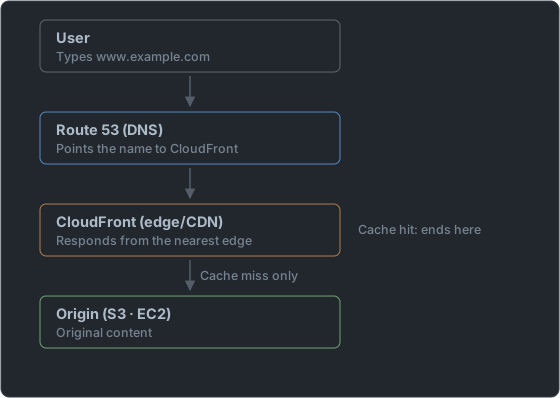
When a user enters a domain → Route 53 directs "this name goes to CloudFront" → CloudFront serves the content from the nearest edge → and goes to the origin (S3, EC2) only when the content isn't at the edge. This combination completes the division of roles: "name resolution is Route 53, fast delivery is CloudFront, origin storage is S3."
⚠️ Pitfall: CloudFront (CDN) and Route 53 (DNS) are easy to confuse. CloudFront "delivers content quickly," and Route 53 "converts names to addresses." Both use edge infrastructure, but they do different jobs. "Caching content to reduce latency" = CloudFront; "routing the domain to the nearest Region" = Route 53.
AWS Global Accelerator — The Third Name
One more name that appears in the edge story is AWS Global Accelerator. It's easy to confuse with CloudFront, so we'll just stake out its place.
If CloudFront works by copying content to the edge, Global Accelerator works by improving only the path, without copying. Users enter through a nearby edge and then travel over AWS's global network to the origin Region. It's closer to taking a dedicated highway instead of the crowded regular internet.
| Aspect | CloudFront | Global Accelerator |
|---|---|---|
| What it does | Caches content at the edge | Optimizes the path (no caching) |
| Suited for | Images, videos, web pages | Games, real-time communication, non-HTTP traffic |
| Key keywords | Cache, CDN, static content | Static IP, cross-Region failover, minimized latency |
At the intro level, a distinction like "if you see the word caching, it's CloudFront; if it's real-time or non-HTTP traffic with nothing to cache, it's Global Accelerator" is enough. Global Accelerator isn't covered deeply in CLF-C02, but to stay steady when it appears among the answer choices, you need to know this one line.
How It Appears on the Exam — Keyword → Answer Mapping
Keyword matching works especially well for edge-service questions.
| Phrase seen in the question | Answer candidate |
|---|---|
| Deliver content to users worldwide with low latency | CloudFront |
| Cache images and videos close to users | CloudFront |
| Want to reduce the load on the origin server | CloudFront |
| Place in front of a static website (S3) to provide acceleration and HTTPS | CloudFront |
| Protect against DDoS attacks | CloudFront + AWS Shield |
| Block malicious web requests (injection, etc.) | AWS WAF |
| Connect a domain name to an IP or AWS resource, register a domain | Route 53 |
| Check whether a target is alive and route around it if it dies | Route 53 health checks + failover |
| Split traffic 90:10 to test a new version | Weighted routing |
| To the Region with the fastest response for the user | Latency-based routing |
| Apply different content or regulations per country | Geolocation routing |
| Switch to a standby when the primary server fails | Failover routing |
| Content edits are not showing up | Wait for the cache TTL to expire, or invalidate |
| Optimize only the path without caching, need a static IP | Global Accelerator |
⚠️ Pitfall: The confusing spot is the phrase "send to the nearest place." This phrase alone can't separate CloudFront from Route 53. If it's about storing content and serving it, it's CloudFront; if it's about telling which address to go to, it's Route 53.
Summary
Today's two protagonists are a pair that solves the distance problem. CloudFront is the CDN — it caches content at edge locations worldwide and delivers it quickly from a place near users, while also protecting the origin server. Route 53 is the DNS — it converts domain names into IPs and AWS resources, and sends traffic smartly through routing policies such as weighted, latency, and failover. The two usually cooperate in the form "Route 53 guides and CloudFront delivers."
Here is a one-line note on each thing we added today. With CloudFront, the more cache hits there are, the faster it gets and the idler the origin is; what decides how long that cache lives is the TTL, and when in a hurry you clear it with an invalidation. The culprit behind "I edited it but it isn't showing up" is usually this cache. And CloudFront has not only performance but also a security face of HTTPS, Shield, WAF, and hiding the origin.
On the DNS side, the starting point of every distinction is that DNS tells you only the address and doesn't deliver the content. So if it's "caching and delivery," it's CloudFront; if it's "name resolution and where to send," it's Route 53. For the five routing policies, rather than memorizing the names, it lasts much longer if you remember them by the difficulty each one was meant to solve (only one server / opening gradually / fastest / hand over when it dies / by country).
Tomorrow we'll tie together this week's Core Services 1 (compute, storage, networking, edge) into one big picture for review.
📝 Practice Questions
Click a choice to reveal the answer and explanation.
Question 1
To deliver images and videos to users worldwide with low latency, you want to cache content at outposts close to users. Which service is the best fit?
Question 2
Which AWS service connects a domain name a user entered (example.com) to an actual IP address or AWS resource?
Question 3
You have servers in the U.S. and Europe, and you want to automatically connect each user to the region with the fastest response. Which Route 53 routing policy is the best fit?
Question 4
Which is the most accurate description of an Edge Location?
Question 5
Which most accurately distinguishes the roles of CloudFront and Route 53?